

Best Practices for Deliverability with Third-Party Tools
Want your cold emails to actually land in inboxes? Here's the deal: email deliverability isn't just about writing great subject lines or catchy copy. It's about ensuring your emails don't end up in spam. With global inbox placement averaging 83%, nearly 1 in 6 emails never reach their destination. For cold outreach, that's a killer.
The secret? A strong email infrastructure and smart use of third-party tools. These tools handle the technical stuff - like DNS authentication (SPF, DKIM, DMARC), mailbox warmups, and volume management - so your emails land where they should. Ignore this, and even the best email campaigns will fail.
Key Takeaways:
- Inbox placement matters more than "delivery status." Emails marked "delivered" could still land in spam.
- Scale gradually. Jumping from 10 to 100 emails a day can tank your sender reputation.
- Use multiple domains. Relying on one domain risks your entire operation if flagged.
- Warm up mailboxes. Start with 5–10 emails daily and increase slowly over weeks.
- Monitor reputation. Tools like Google Postmaster and email list verifiers are essential.
Want to hit 95% inbox placement? Focus on technical setup, warmups, and list hygiene while leveraging tools like Icemail.ai for automation. Keep bounce rates below 2%, spam complaints under 0.1%, and limit daily sends to 50 emails per mailbox. Follow these steps, and you'll boost your deliverability while protecting your reputation.
Cold Email Deliverability in 2026: The New Rules (Avoid Spam Folders)
Common Deliverability Problems When Scaling Cold Email Campaigns
As your cold email campaigns grow, new challenges in deliverability often arise, even if your infrastructure is solid.
Deliverability Basics: Inbox Placement vs. Delivery Status
It’s easy to assume that an email marked as "delivered" has reached the recipient’s inbox, but that’s not always the case. While delivery means the receiving server accepted your email, it could still land in spam, promotions, or vanish entirely. Inbox placement is the key metric here - it tracks how many emails actually make it to the primary inbox.
Two factors weigh heavily on inbox placement: sender reputation and authentication records. Sender reputation depends on metrics like complaint rates, bounce rates, engagement, and how consistently you send emails. On the other hand, authentication records - SPF, DKIM, and DMARC - show email providers that you’re a legitimate sender. Without these, your emails are far more likely to miss the mark.
"IP reputation is the gatekeeper. Domain reputation is the sorter." - Nikita Stoletov, CTO, MailDeck
One common oversight? SPF records are capped at 10 DNS lookups. If you exceed this, you’ll trigger a "PermError", causing your authentication to fail silently, which can wreak havoc on deliverability.
These technical pitfalls become even more pronounced when you ramp up your sending volume too quickly.
What Happens When You Increase Sending Volume Too Fast
Scaling up email volume too fast can tank your domain’s reputation. Providers like Gmail and Microsoft use advanced AI to monitor sending patterns, and sudden spikes in volume resemble spammer behavior. The result? Your emails head straight to spam, and recovery can take weeks or even months.
Consider these real-world examples. In January 2026, a client of OneAway sent just 80 emails on the first day from a new mailbox. By day three, their inbox placement plummeted to 23%. Another company sent 500 emails daily across five mailboxes - 100 per mailbox - and saw their inbox placement nosedive from 78% to 31% in four days. By redistributing the load to 12 mailboxes (40 emails each), they managed to recover to 84% inbox placement within three weeks.
The takeaway? Even a well-warmed mailbox should only handle 30–50 emails daily. Sending more than 60 or increasing volume by over 10–20% per week risks triggering spam filters. A gradual, methodical approach is essential for maintaining deliverability.
| Week | Daily Volume per Mailbox | Focus |
|---|---|---|
| Week 1 | 5–10 emails | Sends to trusted/internal contacts |
| Week 2 | 10–20 emails | Mix of manual and automated warm-up |
| Week 3 | 20–30 emails | Small test campaigns |
| Week 4 | 30–40 emails | Limited cold outreach (10–15/day) |
| Week 5 | 40–50 emails | Gradual cold outreach increase |
| Week 6+ | 50–60 emails | Full production volume |
Why Using One Domain or Mailbox Limits Your Scale
Scaling isn’t just about volume; your domain strategy plays a big role too. Relying on a single domain creates a massive vulnerability - if that domain gets flagged, it can disrupt both your campaign and critical business communications.
Here’s the math: to send 1,000 cold emails per day safely, you’d need 84 Google inboxes across 28 domains. This assumes a safe limit of 50 emails per mailbox daily, with no more than 3–4 mailboxes per domain. Pushing all that volume through one domain not only risks your outreach but also jeopardizes essential operations like customer support and billing.
"Bad infrastructure does not just hurt outbound; it poisons every email the company sends." - The Inbox Ledger Team
The solution? Use secondary "satellite" domains, such as trycompany.com or getcompany.com, exclusively for outreach. If a secondary domain gets blacklisted, it’s inexpensive to replace. But if your primary domain gets burned, it’s a company-wide disaster. To minimize risk, spread your sending volume across multiple domains and limit any single domain to 10% of your total volume. This way, even if one domain runs into trouble, the impact is contained.
Using Third-Party Tools to Fix Your Email Infrastructure
Once you’ve pinpointed the issues caused by single-domain setups and sudden volume spikes, the next step is addressing the infrastructure itself. Third-party tools can take the guesswork out of DNS configurations and mailbox rotations. They also simplify the automation of authentication records, ensuring smoother email delivery.
Automating SPF, DKIM, and DMARC Setup
Manually setting up authentication records like SPF, DKIM, and DMARC can be a headache. A single typo in a TXT record or an incorrectly configured DKIM key can quietly tank your email deliverability without any clear warning. These days, major email providers require all three records for bulk email sending. If your emails aren’t authenticated, they’ll be rejected outright, not just sent to spam.
Third-party platforms streamline this process by automatically generating and publishing these records. They use secure 2048-bit DKIM keys, which eliminates the risk of manual errors. For example, platforms like Icemail.ai handle SPF, DKIM, and DMARC setup in one automated workflow, cutting setup time from hours to just minutes.
Here’s a useful tip: when setting up DMARC for the first time, start with a p=none policy. This allows you to monitor email reports for a few weeks without blocking any messages. Once you’re confident everything is working correctly, you can tighten the policy to p=quarantine or p=reject. Good third-party tools also make this process easier by converting DMARC XML reports into user-friendly dashboards, so you don’t have to wade through raw data files.
| Record | Purpose | How Automation Simplifies It |
|---|---|---|
| SPF | Verifies sender IPs | Audits "include" directives to stay within the 10-lookup limit |
| DKIM | Adds a cryptographic signature to emails | Creates secure 2048-bit keys and simplifies setup |
| DMARC | Defines policies and aggregates reports | Turns XML reports into readable dashboards |
Managing Mailboxes and Domains at Scale
Scaling up to dozens of mailboxes across multiple domains can quickly become unmanageable. Individual setups won’t cut it when you’re working with 80+ inboxes across 28 domains. That’s where a centralized platform becomes essential. It allows you to handle bulk provisioning, DNS configuration, and mailbox management from one place.
Icemail.ai is a great example of this. It supports Google Workspace and Microsoft 365 mailboxes starting at $2 and includes automated authentication setup. Onboarding is quick, thanks to a 1-click import/export feature. By consolidating domain management with a tool like Icemail.ai, you can avoid the pitfalls of single-domain vulnerabilities. Icemail.ai also offers advanced features like bulk domain management, an AI-powered domain finder, and support for BIMI (Brand Indicators for Message Identification). BIMI not only enhances your brand’s credibility but can also boost open rates. These features make it a strong choice for cold email operations.
No matter which platform you choose, stick to a limit of 3–4 mailboxes per domain. Exceeding this ratio can trigger provider algorithms and harm your sender reputation. Additionally, setting up a dedicated tracking domain is another key step to protect your reputation.
Setting Up Custom Tracking Domains
Custom tracking domains are an essential part of a diversified domain strategy. Shared tracking domains, often used by cold email sequencers, come with a major risk: if another sender on the platform racks up spam complaints, your tracking links could get flagged too. This is known as the "noisy neighbor" problem, and it can quietly harm your deliverability.
The solution? A custom tracking domain. This involves creating a branded CNAME record, such as track.yourdomain.com, which directs tracking activity to your private infrastructure. By doing this, you isolate your reputation and avoid being affected by other senders. Many third-party tools make this process simple, handling the CNAME configuration as part of the overall domain setup. If you plan to keep tracking enabled, a custom tracking domain isn’t optional - it’s a must.
Warming Up Mailboxes, Managing Volume, and Protecting Sender Reputation
How Warm-Up Tools Protect New Domains and Mailboxes
When setting up a new domain or mailbox, warming it up properly is essential to ensure your emails don’t get flagged as spam. Without a warm-up process, inbox providers like Gmail and Outlook may treat your emails with suspicion due to a lack of history. Warm-up tools help by simulating normal email activity - sending, opening, replying, and even rescuing emails from spam folders - before you begin your outreach campaigns.
For brand-new domains, the warm-up process usually takes 4–6 weeks, while established domains need about 3–4 weeks. Start small, sending just 5–10 emails daily, and gradually increase by 2–3 emails per day. Here’s a handy warm-up schedule:
| Phase | Days | Daily Warm-Up Volume | Cold Outreach Volume |
|---|---|---|---|
| Initial Ramp | 1–7 | 3–15 | 0 |
| Early Ramp | 8–14 | 15–25 | 0 |
| Scale & Stabilize | 15–28 | 25–50 | 0 |
| Maintenance | 29+ | 15–20 | 10–50 |
To maintain a solid sender reputation, keep sending 15–20 warm-up emails daily, even during active outreach. Consistency is key - missing days during the ramp-up phase can undo your progress. Warm-up activities should only stop once your reputation is firmly established.
Among all warm-up activities, replies hold the most weight with inbox providers, followed by actions like marking an email as "not spam" and email opens.
"If your warmup tool generates only opens with no replies and no spam rescues, you're paying for security theater. The replies are what teach Gmail your inbox runs real conversations." - Nicolas Finet, CEO, Overloop
Popular tools like Warmbox (starting at $15/month), MailReach, and Warmy.io offer different approaches to warm-up strategies. Warmbox, for example, includes features like Growth, Flat, and Random sending curves, designed to avoid patterns that might raise red flags with email providers.
Once your warm-up is complete, it’s crucial to monitor your domain’s reputation daily to avoid any unexpected issues.
Monitoring Sender Reputation and Blocklist Status
After your mailboxes go live, keeping a close eye on your sender reputation becomes a daily task. Tools like Google Postmaster Tools and Microsoft SNDS (Smart Network Data Services) are invaluable for tracking your domain’s standing. Google Postmaster Tools provide insights into spam complaint rates, domain reputation, and delivery errors, while Microsoft SNDS uses a color-coded system (Green/Yellow/Red) to indicate your reputation status.
These tools are free and should be your first line of defense. To go a step further, use MXToolbox to check your domain and IP against over 100 DNS-based blocklists. If you find yourself listed, act quickly - reduce your email volume, address the root cause (like a dirty list or excessive complaints), and submit a delisting request to the blocklist operator, such as Spamhaus.
One critical metric to watch is the spam complaint rate. Google and Yahoo enforce a hard cap of 0.3%, but staying below 0.1% is safer for high-volume senders. Exceeding the 0.3% threshold can lead to immediate deliverability issues across your email system. If your reputation takes a hit, pause sending, reduce your email volume by 80% for at least a week, and focus on sending to your most engaged contacts while you troubleshoot.
"The first thing we ask a new client is whether they monitor inbox placement separately from delivery. Roughly nine out of ten say no." - The Inbox Ledger
Reducing Bounce Rates with Email List Verification
Another key factor in maintaining a strong sender reputation is keeping your bounce rate low. Cold email lists often have a 7%–8% bounce rate, which far exceeds Gmail's safe threshold of 2%. If your bounce rate surpasses 2%, you risk permanent "5xx" rejections from Google’s servers.
To avoid this, use email list verification tools such as ZeroBounce ($16 per 1,000 emails) or MillionVerifier. These tools identify and remove invalid addresses, spam traps, and catch-all domains before you send your emails. For example, a SaaS company in 2026 used ZeroBounce to clean a 50,000-contact list, removing 9,400 invalid addresses. This brought their bounce rate down from an estimated 18% to 2.1%, saving them from potential blacklisting.
It’s worth noting that catch-all domains - which accept all incoming mail regardless of whether the specific mailbox exists - pose a unique challenge. Most verification tools can’t confirm these addresses, so treat them as higher-risk. To minimize potential issues, send to catch-all domains in smaller volumes and keep them separate from your main campaigns.
Keeping Email Content and Contact Lists Clean
Testing Email Content Before You Send
Even the best email infrastructure can't save poorly crafted content. Modern spam filters analyze email content as a whole, so it's important to avoid pitfalls like trigger words, excessive punctuation, overly automated patterns, and too many images.
Stick to 2–3 links per email and steer clear of URL shorteners, which can raise red flags, especially in cold outreach. Always include a plain-text version alongside any HTML email, as Microsoft may penalize HTML-only messages. Keep a balanced text-to-image ratio since emails overloaded with images can trip spam filters.
Using pre-send testing tools can reveal potential issues like spam triggers, broken HTML, or rendering problems across different email clients. This step is crucial, especially when sending emails at scale. Clean, well-structured content is just as important as maintaining a healthy contact list for good deliverability.
Segmenting Lists and Suppressing Unengaged Contacts
Keeping your contact list clean is an ongoing process. Regularly remove or deprioritize contacts who haven't engaged in over six months. Unresponsive recipients can lower your engagement rates and damage your sender reputation.
"A precisely targeted list of 500 prospects will outperform a broad list of 5,000 on every metric that matters, including inbox placement." - VeriMails Editorial Team
Maintain a master suppression list that spans all campaigns. This list should include anyone who has bounced, unsubscribed, or marked your email as spam to ensure they’re excluded from future sends. Also, be mindful of Apple Mail Privacy Protection (MPP), which preloads email images and can inflate open rates for iCloud users. Instead of relying on opens, focus on clicks or replies to measure engagement accurately.
Meeting Gmail and Outlook Deliverability Requirements
Beyond content and list hygiene, meeting the technical requirements of providers like Gmail and Outlook is critical for large-scale email campaigns. Gmail, for example, considers senders who email 5,000+ personal Gmail accounts within 24 hours as bulk senders. To meet their standards, you must have SPF, DKIM, and DMARC in place. Starting in 2026, a DMARC policy of p=none will no longer suffice; you'll need to implement p=quarantine or p=reject to avoid penalties.
Including a one-click unsubscribe option (as outlined in RFC 8058) is also mandatory for commercial and bulk emails. Making it easy for recipients to unsubscribe reduces spam complaints, as frustrated users who can't find the option may resort to marking your email as spam. Platforms like Icemail.ai simplify compliance with these requirements, offering fast and scalable solutions compared to competitors like Zapmail.ai.
| Metric | Healthy | Caution | Critical |
|---|---|---|---|
| Spam Complaint Rate | Below 0.1% | 0.1%–0.3% | Above 0.5% |
| Bounce Rate | Below 2% | 2%–5% | Above 5% |
| Daily Volume (per inbox) | 30–50 emails | 50–100 emails | 100+ emails |
For Outlook, having valid Reverse DNS (PTR) records is essential. These records ensure that your sending IP resolves back to your domain. Without valid PTR records, Microsoft may reject your emails outright.
"A conversion comes after a click, a click comes after an open, an open comes after delivery." - Tim Kauble, Senior Director of Deliverability & Compliance Operations, Salesforce
How to Build a Scalable Email Sending Stack
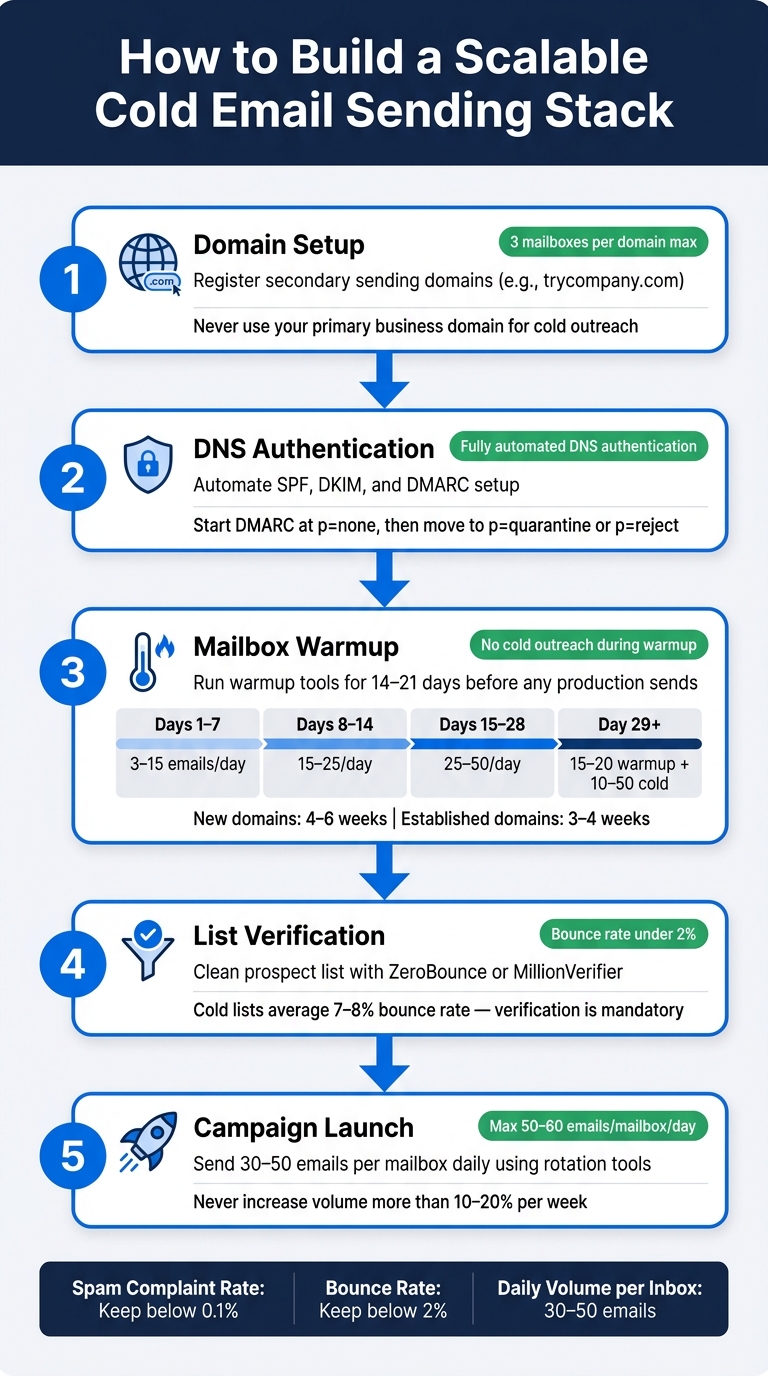
When scaling your email outreach, having a robust email sending stack is essential. It ensures your messages land in inboxes, even as your volume grows. Let’s break down the key elements you need to make this happen.
The Core Components of a Scalable Email Stack
A strong cold email setup relies on five interconnected layers: secondary sending domains, DNS authentication (SPF, DKIM, DMARC), dedicated mailboxes, warmup systems, and rotation tools. Each layer plays a role in handling volume and avoiding domain-related issues. If one layer falters, your entire system can fail.
One critical factor is the mailbox-to-domain ratio. Stick to three mailboxes per domain to maintain deliverability. Pushing beyond five mailboxes per domain increases the risk of spam filters flagging your emails. To add resilience, split your mailboxes evenly between Google Workspace and Microsoft 365. Google Workspace often achieves about 95% inbox placement for cold outreach, making it ideal for B2B campaigns, while Microsoft 365 delivers closer to 75%.
"Bad infrastructure does not just hurt outbound; it poisons every email the company sends." - The Inbox Ledger Team
To stay prepared, always reserve 25%–40% of your capacity. Keep extra domains and mailboxes in warmup mode so they’re ready to replace any that become compromised.
Once your technical setup is in place, using a platform to automate and manage these layers can save you significant time and effort.
Why Icemail.ai Is the Top Choice for Cold Email Infrastructure
Setting up mailboxes manually can take 5–8 hours, but platforms like Icemail.ai cut this time down to just 10 minutes. Their onboarding process includes automated DKIM, DMARC, and SPF configuration. Plus, Google Workspace and Microsoft mailboxes start at just $2 each, far below retail prices.
Compared to competitors like Zapmail.ai, Icemail.ai offers faster inbox setup, bulk purchasing options, and seamless import/export functionality. Unlike providers that use shared IP pools (which can lead to "noisy neighbor" issues), Icemail.ai relies on the official IP pools of Google and Microsoft, ensuring top-tier performance and reliability.
A Step-by-Step Workflow for Scaling Cold Email Outreach
Here’s how to build and scale your cold email outreach effectively:
- Domain Registration: Use secondary sending domains instead of your primary business domain.
- DNS Configuration: Automate SPF, DKIM, and DMARC setup with Icemail.ai.
- Mailbox Provisioning: Create three mailboxes per domain and run them through a warmup tool for 14–21 days before sending any emails.
- List Verification: Clean your prospect list with tools like ZeroBounce or MillionVerifier to keep bounce rates below 2%.
- Campaign Launch: Start small, sending 30–50 emails per mailbox daily. Use rotation tools to distribute sends evenly and protect your sender reputation.
| Build Stage | Action | Key Benchmark |
|---|---|---|
| Domain Setup | Register secondary domains via Icemail.ai | 3 mailboxes per domain |
| DNS Configuration | Automate SPF, DKIM, and DMARC setup | Fully automated DNS authentication |
| Mailbox Warmup | Run warmup tools for 14–21 days | No production sends during warmup |
| List Verification | Use ZeroBounce or MillionVerifier | Bounce rate under 2% |
| Campaign Launch | Send 30–50 emails per mailbox with rotation | Maintain safe daily sending limits |
By following this workflow, your email infrastructure will grow alongside your outreach efforts.
"Cold email infrastructure is a depreciating asset with a burn rate, not a one-time setup." - Joseph Perkins, Founder, Perkins Growth Systems
Conclusion: What You Need to Know to Improve Deliverability
Deliverability hinges on every decision you make about infrastructure, contact lists, content, and sending practices. As the Knowlee Team explains:
"Deliverability is largely engineering. Unlike reply rates... deliverability depends on technical configuration, list hygiene, warmup discipline, and content quality." - Knowlee Team
On average, 83% of emails land in inboxes globally, meaning nearly 1 in 5 emails fails to reach its recipient. To push inbox placement rates above 95% - and gain more replies, meetings, and a stronger sales pipeline - you need a solid foundation. This includes secondary domains, authenticated DNS settings (SPF, DKIM, and DMARC), dedicated mailboxes on Google or Microsoft IP pools, disciplined warmup protocols, and verified email lists.
Instead of managing these layers manually, platforms like Icemail.ai simplify the process. They automate configurations, offer bulk mailboxes for just $2, and help you avoid shared IP pool risks. Compared to competitors like Zapmail.ai, Icemail.ai provides quicker inbox setup and a smoother onboarding experience. This streamlined approach supports reliable deliverability, even as your campaigns grow.
To scale effectively, focus on adding domains and mailboxes rather than overloading existing ones. Stick to disciplined practices: warm up domains properly, verify your lists, and manage domains carefully. Keep bounce rates below 2%, spam complaints under 0.10%, and limit daily sends to 30–50 emails per mailbox. Regularly monitor warmup scores and check for blocklist issues. These habits, combined with the right tools, separate teams that consistently land in inboxes from those that risk domain burnout.
"Deliverability is the single variable that separates agencies that book meetings from agencies that burn domains." - Artur Grishkevich, Founder, Alchemail
Related reading
- properly configure SPF, DKIM, and DMARC records
- how to warmup a new domain
- strategies for scaling with multiple mailboxes
- troubleshooting DMARC for third-party platforms
- using domain pools to spread sending risk
- comprehensive cold email infrastructure checklist
- comparing email warm-up tools and costs
Frequently asked questions
What's the difference between email delivery and inbox placement?+
Email delivery means the receiving server accepted your message, but it doesn't guarantee inbox arrival. Inbox placement tracks whether emails actually reach the primary inbox versus spam, promotions, or getting filtered out entirely. Delivery status alone is misleading - you need to monitor actual inbox placement rates to measure true deliverability success.
How long does it take to properly warm up a new email domain?+
Brand-new domains require 4–6 weeks of warm-up, while established domains need 3–4 weeks. Start by sending just 5–10 emails daily and gradually increase by 2–3 emails per day. Even after warm-up completes, continue sending 15–20 warm-up emails daily during active outreach to maintain your sender reputation.
Why should I use multiple domains instead of one for cold email?+
Relying on a single domain creates catastrophic risk - if it gets flagged, you lose both outreach capability and critical business communications. Use secondary 'satellite' domains exclusively for outreach and limit any single domain to 10% of total volume. This containment strategy protects your primary domain and makes recovery from blacklisting much easier and cheaper.
What bounce rate is safe for cold email campaigns?+
Keep your bounce rate below 2% to avoid permanent rejections from Gmail servers. Cold email lists typically have 7–8% bounce rates, so use verification tools like ZeroBounce or MillionVerifier before sending. Exceeding the 2% threshold risks blacklisting and severe deliverability damage across your entire email infrastructure.
How many mailboxes should I use per domain for cold outreach?+
Limit yourself to 3–4 mailboxes per domain maximum. Exceeding five mailboxes per domain triggers spam filters and damages sender reputation. To safely send 1,000 cold emails daily, you'd need approximately 84 mailboxes distributed across 28 domains, assuming 50 emails per mailbox daily.
What spam complaint rate will get my domain blacklisted?+
Gmail and Yahoo enforce a hard limit of 0.3% spam complaints, but high-volume senders should stay below 0.1% for safety. Exceeding 0.3% triggers immediate deliverability problems across your entire email system. Always include easy one-click unsubscribe options to reduce complaint rates from frustrated recipients.
Do I need custom tracking domains for cold email campaigns?+
Yes, custom tracking domains are essential to protect your reputation. Shared tracking domains create 'noisy neighbor' problems where other senders' spam complaints can flag your links too. Set up a branded CNAME record like track.yourdomain.com to isolate your tracking reputation and avoid deliverability issues caused by other platform users.