

DMARC Troubleshooting for Third-Party Email Platforms
If a third-party tool sends email as your domain, DMARC can fail even when SPF or DKIM says “pass.” In most cases, the problem is simple: the domain that passed SPF or DKIM does not match the domain people see in the From address.
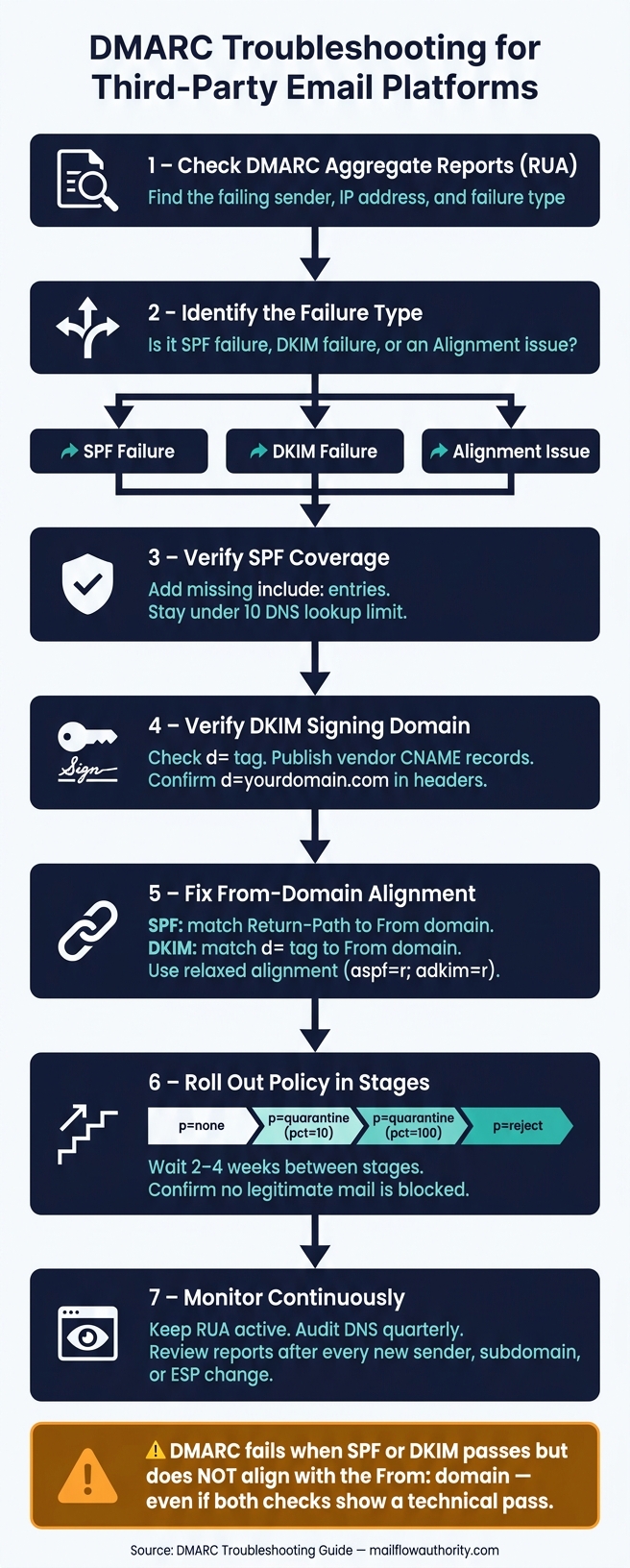
Here’s the short version of how I’d handle it:
- I’d check DMARC aggregate reports (RUA) first to find the sender, IP, and failure type
- I’d confirm whether the problem is SPF, DKIM, or alignment
- I’d look at the DKIM
d=domain, the Return-Path, and the visible From domain - I’d fix the vendor setup by adding SPF includes or DKIM CNAMEs
- I’d keep DKIM aligned to my domain whenever possible, since SPF can break during forwarding
- I’d stay under the 10-DNS-lookup SPF limit
- I’d move DMARC policy in steps:
p=none→p=quarantine→p=reject - I’d review reports for at least 2–4 weeks before tightening policy after platform or ESP changes
A few warning signs often show up before teams spot the root cause: lower reply rates, more spam placement, Microsoft 550 5.7.515 bounces, Gmail 5.7.26 errors, or a “via [provider.com]” label in the inbox.
The main thing to remember is this: DMARC does not care only about pass/fail. It cares whether SPF or DKIM passes and lines up with your From domain. If that match is missing, DMARC can still fail.
Use this page to find the sender, fix the mismatch, and roll out policy changes without blocking mail you meant to send.
How to Fix DKIM & DMARC Issues on Instantly?
Review DMARC Reports Before Changing DNS
Start with DMARC reports. They show which platform is sending, whether it passes, and whether it aligns with your From domain. Read the reports before you touch DNS. That first pass usually tells you which sender failed and why. Once you know the failing sender, check SPF, DKIM, and alignment in that order.
Use Aggregate Reports to Find the Failing Sender
Aggregate reports (RUA) are daily XML summaries sent by mailbox providers like Google, Microsoft, and Yahoo. Each report lists every IP address that sent mail claiming to be from your domain, along with message counts and authentication results.
Pay close attention to auth_results and policy_evaluated.
auth_resultsshows whether SPF or DKIM passedpolicy_evaluatedshows whether that pass aligned with the From domain
Here’s the part that trips people up: if auth_results shows a pass but policy_evaluated shows a fail, the third-party service is usually signing with its own domain instead of yours. That means you’re dealing with an alignment issue, not a bad DNS record.
Raw XML isn't fun to read. A DMARC parser makes it much easier by turning that XML into something you can scan in a few minutes instead of squinting at tags for half an hour. Then sort what you find into four buckets: known sender, passing; known sender, failing; unknown sender, passing; and unknown sender, failing.
That sorting step matters. The job isn't only to spot failures. It's to figure out which vendor, sub-account, or workflow caused them.
"The most common surprise in DMARC reports: a booking tool (Calendly, Acuity) sending confirmation emails as your domain. Someone on the team connected it months ago and nobody updated SPF." - Braedon, Mailflow Authority
Use the failing IP and the authentication result to trace the exact sender before changing DNS.
Use Forensic Reports When Available
Use RUF only when RUA points to a clear failure but still doesn't show which workflow caused it. Forensic reports (RUF) are sent near real-time for individual message failures. They include headers, subject lines, and sometimes body content.
They help most when aggregate data shows a failure from a known service, but you still can't tell which workflow or sub-account broke. A good example is finding one broken automated sequence inside a larger HubSpot setup.
RUF support is uneven. Gmail doesn't send it, and Yahoo and Microsoft limit it. So treat forensic reports as a backup tool when they're available, not your main source.
RUA shows source IPs, message volume, SPF/DKIM results, and alignment. RUF shows individual failures with headers, subject lines, and sometimes message content.
After you isolate the sender, move to SPF, DKIM, and alignment checks.
Check SPF, DKIM, and DMARC Alignment in Order
Use the sender IP, auth_results, and policy_evaluated from the reports to pinpoint what broke. That sequence tells you whether the issue came from SPF, DKIM, or alignment.
Verify SPF Covers Every Legitimate Sender
Match each approved sender against your SPF record. If a platform sends mail for your domain, it may need its own include: entry. Miss one sender, and mail from that source can fail authentication.
SPF also has a hard cap of 10 DNS lookups. Go past that, and receiving servers return a PermError. When that happens, SPF stops working for your domain. Use one SPF record only, and keep it below the 10-lookup cap.
If you're getting close to that limit, move heavy senders to a subdomain.
Verify DKIM Is Signing With Your Domain
Check the d= tag in a test message header. That tag shows which domain signed the message. If you see the provider's domain instead of d=yourdomain.com, the platform is signing with its own domain. In that case, DKIM alignment fails even when the signature itself passes.
The usual fix is to add the needed CNAME records. After that, make sure the selector exists in DNS. A missing selector record is one of the most common reasons DKIM fails after setup.
"Don't chase SPF alignment with every ESP. Most ESPs make custom Return-Path harder to configure than custom DKIM. Focus on DKIM alignment - it's more reliable anyway because it survives forwarding." - Braedon, Mailflow Authority
Check Whether SPF or DKIM Aligns With the From Domain
DMARC passes when either SPF or DKIM passes and aligns with the From domain.
For SPF, alignment means the Return-Path domain matches the visible From: header domain. Many third-party platforms use their own bounce domain by default, so SPF alignment breaks even when the SPF check passes.
For DKIM, alignment means the d= domain in the signature matches the From: header domain. Check the Authentication-Results header, find header.from, and compare it with smtp.mailfrom for SPF and the d= tag for DKIM. That check tells you fast whether alignment is the issue.
Use relaxed alignment - aspf=r; adkim=r - unless you need strict alignment. Relaxed alignment lets mail.yourdomain.com line up with yourdomain.com, which helps avoid false failures from subdomains used by approved senders.
SPF, DKIM, and DMARC Alignment: What Passing and Failing Look Like
| Alignment Scenario | SPF Result | DKIM Result | DMARC Result |
|---|---|---|---|
| Full Pass | Pass & Aligns | Pass & Aligns | PASS |
| DKIM Only | Fail/No Align | Pass & Aligns | PASS |
| SPF Only | Pass & Aligns | Fail/No Align | PASS |
| Alignment Fail | Pass (Provider) | Pass (Provider) | FAIL |
| Auth Fail | Fail (IP) | Fail (Key) | FAIL |
The case to watch is a technical pass without alignment. SPF and DKIM can both pass on paper, but if neither one lines up with the From: domain, DMARC still fails.
Once you've pinned down whether SPF, DKIM, or alignment failed, fix the platform's DNS or domain settings before you touch policy.
Fix Third-Party Sender Conflicts Without Hurting Deliverability
Once you know which check failed and why, the fix usually comes down to three things: publish the vendor’s SPF include and DKIM CNAMEs, fix domain alignment, and protect deliverability when mail is forwarded or your setup changes. One thing matters here: use the sender named in the DMARC report, not just the platform name, to pick the right fix.
Publish the Vendor's SPF Include and DKIM CNAMEs
For new senders, DKIM alignment should be your first choice.
With SPF, add the provider’s include: mechanism to your current record. If your SPF record is getting close to the 10-lookup limit, move that sender to a subdomain with its own SPF record. That keeps you from hitting the wall later.
For DKIM, publish the vendor’s DKIM CNAMEs and then confirm the header shows d=yourdomain.com. Don’t stop at DNS. Send a test message and check the Authentication-Results header yourself, because records sitting in DNS don’t prove the platform is signing mail in live traffic. If the header still shows the vendor domain, the alignment fix isn’t done yet.
Fix From-Domain Alignment
A platform can pass both SPF and DKIM and still fail DMARC. Why? Because DMARC cares about alignment. If neither authenticated domain matches your From: header, the message can still fail.
Start with custom DKIM. If SPF alignment still fails, use a custom MAIL FROM/return-path. The goal is simple: the authenticated domain needs to match the From domain.
If a platform doesn’t support custom DKIM or a custom MAIL FROM/return-path at all, your last option is to change the From: address so it uses the platform’s own domain. It’s not ideal, but it takes your domain out of the picture and stops DMARC failures from hurting your domain’s reputation.
Handle Forwarding and Infrastructure Changes Safely
If authentication fails only after relay, inspect the delivery path first, not the DNS record. That’s usually where the problem starts.
When forwarding breaks both SPF and DKIM, use ARC. ARC lets intermediate servers vouch for the original authentication results, so the final receiving server can still judge whether the message was legitimate before it got forwarded.
Infrastructure changes can also trigger surprise DMARC failures, even when everything looked stable before. Switching ESPs is a common example. The senders most likely to break after a change are often the ones people forget about: billing tools, support platforms, and automation workflows.
Before any ESP cutover, review 2–4 weeks of aggregate reports for every sender. Then retest authentication after each change. Treat every new sender as its own authentication check.
Roll Out Policy Changes and Keep DMARC Stable
Move From p=none to Quarantine or Reject in Stages
Once SPF, DKIM, and alignment are fixed, you can move from monitoring to enforcement.
But don’t jump to p=reject too soon. If even one valid sender isn’t set up right, you can end up blocking mail you meant to send. The safer path is to tighten policy step by step.
Stay on p=none until you’ve identified all senders and confirmed they align. Move forward only after unknown senders are gone.
| Stage | Policy | Purpose |
|---|---|---|
| Monitor | p=none | Identify all legitimate sending sources |
| Trial | p=quarantine; pct=10 | Test enforcement at low volume |
| Contain | p=quarantine; pct=100 | Confirm no legitimate mail is blocked |
| Block | p=reject | Maximum protection against spoofing |
Policy changes are safe only when every new sender is tracked from day one.
Monitor Every New Sender, Domain, and Campaign Change
Every new sender brings new DMARC risk. That’s why monitoring shouldn’t stop once things look clean. Keep it running after every change, and review reports after adding any new third-party sender, subdomain, or workflow.
Keep RUA reporting active on every domain. Set a quarterly DNS audit to remove stale SPF entries and rotate DKIM keys.
A sender inventory helps a lot here. Track:
- each approved platform
- the owner
- its purpose
- the DKIM selector
Don’t approve a new sender until DKIM, SPF, and alignment are verified.
If you have a choice, use services that support custom DKIM. And don’t use your domain unless the service has to send as you.
Conclusion: How to Resolve DMARC Conflicts Step by Step
After policy is stable, keep monitoring active so new senders don’t bring back the same failure. Find the sender that’s failing, fix alignment, and then move enforcement up in stages. DMARC stays stable only when every new sender is reviewed before it goes live.
Related reading
Frequently asked questions
What is DMARC alignment and why does it matter for third-party email platforms?+
DMARC alignment means the domain that passed SPF or DKIM must match your visible From domain. Third-party platforms often sign emails with their own domain instead of yours, causing alignment failure even when SPF or DKIM technically passes. DMARC requires either SPF or DKIM to both pass and align with your From domain for authentication to succeed.
How do I use DMARC aggregate reports to find which sender is failing?+
Check the auth_results and policy_evaluated sections in your RUA reports. Auth_results shows whether SPF or DKIM passed, while policy_evaluated shows alignment status. If auth_results shows a pass but policy_evaluated shows fail, the third-party service is signing with its own domain. Use the failing IP address and authentication results to identify the exact vendor or workflow causing the issue.
What's the difference between SPF alignment and DKIM alignment?+
SPF alignment requires the Return-Path domain to match your From domain. DKIM alignment requires the d= domain in the signature to match your From domain. DKIM is generally more reliable because it survives email forwarding, while SPF often breaks when messages are relayed through intermediate servers.
Why does my SPF record have a 10 DNS lookup limit?+
SPF has a hard cap of 10 DNS lookups to prevent performance issues and abuse. Each include: mechanism counts toward this limit. If you exceed 10 lookups, receiving servers return a PermError and SPF stops working entirely for your domain. To stay under the limit, move heavy senders to subdomains with separate SPF records.
What does the via provider.com label in Gmail mean for DMARC?+
The via provider.com label appears when Gmail detects that email claiming to be from your domain actually came from a third-party service that isn't properly authenticated. This warning sign indicates DMARC alignment failure, meaning the authenticated domain doesn't match your From domain. Fix this by configuring custom DKIM or SPF alignment with the provider.
How should I safely move from p=none to p=reject in DMARC?+
Start with p=none until all legitimate senders are identified and aligned. Then move to p=quarantine with pct=10 to test enforcement on 10% of mail. Gradually increase to pct=100, monitoring reports for 2-4 weeks at each stage. Only move to p=reject after confirming no legitimate mail is blocked and maintaining a 95%+ pass rate for at least one month.
What should I do if a third-party platform doesn't support custom DKIM?+
If a platform doesn't support custom DKIM or custom Return-Path, your last option is changing the From address to use the platform's own domain instead of yours. While not ideal, this prevents DMARC failures from damaging your domain reputation. Alternatively, consider switching to a provider that supports proper domain alignment.