

How Domain Pools Improve Cold Email Deliverability
If cold email inbox placement drops, the issue is often your sending setup - not your copy. I’d fix it by spreading volume across multiple domains and inboxes, keeping each inbox at 30–50 emails per day, warming mailboxes for 14–21 days, and watching bounce rates, complaints, and reply drops by domain.
Here’s the short version:
- I use a domain pool to spread risk across many domains instead of sending from one.
- I keep each domain tied to one audience, niche, or campaign type.
- I never use my main brand domain for cold outreach.
- I set up SPF, DKIM, DMARC, and MX before sending anything.
- I warm inboxes first, then scale slowly.
- I pause weak domains fast and move volume to cleaner inboxes.
- I keep 20%–25% extra warmed inboxes in reserve.
- I retire cold email domains after about 12 months of active use.
A few numbers matter most:
- < 2% bounce rate is a safe target
- < 0.3% spam complaint rate is the line to watch
- 3–5 inboxes per domain is a common range
- Above 1,500 emails/day, I’d split volume across Google Workspace and Microsoft 365
In simple terms, domain pools work because they contain damage. If one list, offer, or niche performs poorly, it doesn’t drag down everything else. That’s the whole point: keep your setup separate, warm, and easy to replace.
Cold Email Deliverability MASTERCLASS – Inbox Every Time! (Full Guide)
Plan the Right Domain Pool for Your Sending Volume
Calculate how many domains and inboxes you need
Once you’ve settled on the pool setup, the next step is simple: make sure it fits your daily send volume.
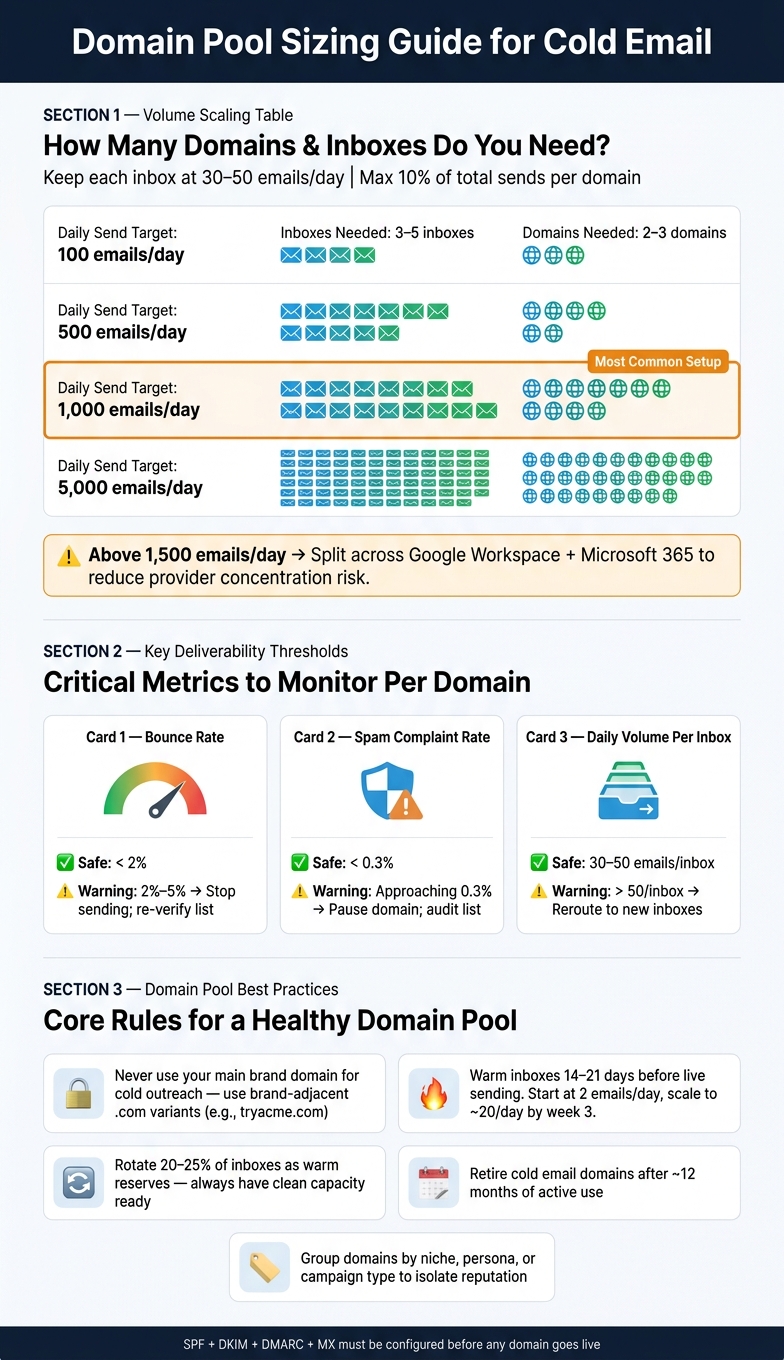
A good rule is to keep any one domain under 10% of total sends and limit each domain to 3–5 sending inboxes. That way, one narrow campaign doesn’t drag the rest of your setup down with it.
Here’s how that looks in practice:
| Daily Send Target | Inboxes Needed | Domains Needed |
|---|---|---|
| 100 emails/day | 3–5 | 2–3 |
| 500 emails/day | 12–17 | 4–6 |
| 1,000 emails/day | 20–25 | 7–10 |
| 5,000 emails/day | 100–125 | 34–42 |
Once you go above 1,500 emails per day, split your setup across Google Workspace and Microsoft 365. That helps lower concentration risk. A simple way to divide it: use Google Workspace for Gmail-heavy audiences and Microsoft 365 for Outlook-heavy enterprise lists.
Group domains by niche, persona, or campaign type
It also helps to group domains by niche, persona, or campaign stage. Each audience gets its own reputation profile, which makes the whole system easier to manage.
For example, one domain cluster might handle outreach to e-commerce founders. Another might target HR directors at mid-market companies. A third could run re-engagement sequences. That separation keeps tests cleaner and stops reputation issues from leaking across very different audiences.
There’s another upside too: troubleshooting gets much easier. If reply rates drop or spam complaints jump, you can spot the problem area fast instead of digging through a mixed setup and guessing where things went wrong.
Keep your main brand domain separate from cold outreach
Keep your main brand domain completely separate from cold outreach.
For outbound, use brand-adjacent .com domains instead. Domains like getacme.com or tryacme.com create distance between cold outreach and your main brand while still looking trustworthy. And when you set up senders, use real names tied to those domains, like john.doe@tryacme.com, instead of generic addresses such as outreach@ or sales1@.
Once your domains are in place, warm up each inbox before you start live sending.
Set Up and Warm the Domain Pool Correctly
Choose Google Workspace or Microsoft 365 and a provisioning tool
After you size the pool, lock in the email provider, DNS records, and warmup plan.
Use Google Workspace for SMB and mid-market lists. Use Microsoft 365 for enterprise and Outlook-heavy lists. If you can, split volume across both. That gives you a safer setup and lowers provider risk.
Icemail.ai automates mailbox provisioning and DNS setup for Google Workspace and Microsoft 365, cutting setup time from hours to minutes.
Set up SPF, DKIM, DMARC, and MX records before sending
Once the mailboxes are ready, authentication is next. No domain should go live until SPF, DKIM, DMARC, and MX records are in place. Miss even one, and delivery can fail right away.
- SPF: Authorize sending servers and keep it under 10 DNS lookups.
- DKIM: Use 2,048-bit keys and rotate them once a year.
- DMARC: Start at
p=none, then tighten the policy after warmup. - MX: Add MX records even for send-only domains.
Warm inboxes for 2 to 3 weeks before live outreach
Once authentication is live, warm each inbox before you send cold email.
Warm inboxes for 14 to 21 days before live sending, then ramp up slowly while keeping warmup active. Start with 2 warmup emails per day. Increase by about 1 per day until you hit around 20 per day by the end of week 3. Do not send cold emails during this period. Keep warmup running even after live sending starts.
Route Campaigns Across the Pool Without Hurting Deliverability
Spread volume across inboxes and stay within safe daily limits
After warmup, the job changes. Now you're routing volume in a way that doesn't pile risk onto a small set of inboxes.
A practical benchmark is to keep daily volume around 30–50 emails per inbox. That range helps you send at a steady pace without pushing too hard.
It also helps to keep only part of the pool active at full volume. Rotate the rest into warmup or recovery. Even domains that look clean can benefit from going back into warmup from time to time. Stable sending patterns tend to keep reputation more steady over time.
From there, assign campaigns to fixed domain sets so each audience keeps its own reputation profile.
Assign each niche campaign to dedicated domains and inboxes
Give each audience segment its own set of domains and inboxes, then leave those assignments in place. In plain English: don't keep moving campaigns around. Keep each campaign on a fixed domain set so performance stays isolated.
For higher-risk tests - new offers, unverified lists, or aggressive subject line experiments - use secondary domains. That way, your primary brand domain has a layer of protection if something goes sideways.
If you're segmenting by audience, match your sender setup to the recipient mailbox provider too.
Track deliverability by domain and pause weak performers quickly
Watch each domain on its own. If one starts slipping, you want to catch it before the problem spreads across the pool.
Keep an eye on these metrics:
| Metric | Healthy Range | Warning Sign | Action |
|---|---|---|---|
| Bounce Rate | < 2% | 2%–5% | Stop sending; re-verify list |
| Daily Volume | 30–50/inbox | > 50/inbox | Reroute volume to new inboxes |
| Spam Complaint Rate | < 0.3% | Approaching 0.3% | Pause domain; audit list |
If reply rates drop all at once and you haven't changed the copy, treat that as an early warning sign.
When a domain shows steady issues, pause all live sending on it, increase warmup volume, and wait 2–4 weeks before testing again with small volume.
Shift volume toward inboxes with better placement, lower bounce rates, and stronger reply rates. And check Google Postmaster Tools every week for domain-level spam complaints, because most sequencing tools don't show that data directly.
Pause weak domains, reroute volume, and retest only after recovery.
Maintain, Scale, and Refresh the Domain Pool Over Time
Run regular health checks and refresh domains on a schedule
Once routing is stable, you can move out of daily send management and into a lighter rhythm: weekly health checks and scheduled refreshes.
Check reputation every week. Run inbox placement tests across each domain cluster once a month. If reputation starts to slip, slow sending right away. Don’t wait for things to get worse.
It also helps to rotate part of the pool into warmup-only mode every 4–6 weeks so those domains get a break. And plan to retire domains after about 12 months of active cold sending. Reputation tends to wear down over time, so planned retirement helps protect the niche clusters that rely on clean separation.
Keep a reserve of 20–25% warmed inboxes unused. That gives you clean capacity on hand when a domain needs to be replaced.
Use premium infrastructure when manual setup slows you down
If manual management starts slowing the pool down, use Icemail.ai to speed up mailbox purchasing and DNS setup for Google Workspace and Microsoft 365 at around $2.5 per mailbox/month.
Conclusion: The core rules that make domain pools work
At this stage, the goal is simple: keep the pool clean, rested, and replaceable.
Monitor performance at the domain level. Move underperforming domains into recovery before reputation damage spreads across niche clusters. Then retire them on schedule instead of waiting for a fire drill.
Related reading
Frequently asked questions
How many emails per day should I send from each inbox in a domain pool?+
Keep each inbox at 30–50 emails per day to maintain healthy deliverability. This volume range allows steady sending without triggering spam filters. Going above 50 emails per inbox increases the risk of reputation damage and lower inbox placement rates.
How long should I warm up new domains before sending cold emails?+
Warm inboxes for 14–21 days before starting live cold outreach. Begin with 2 warmup emails per day and gradually increase by about 1 per day until reaching around 20 per day by week 3. Keep warmup running even after you start live sending to maintain domain health.
What bounce rate is safe for cold email campaigns?+
Keep your bounce rate below 2% for safe cold email sending. If bounce rates climb to 2–5%, that's a warning sign to stop sending and re-verify your list. Consistently high bounce rates damage domain reputation and hurt deliverability across your entire pool.
Should I use my main business domain for cold email outreach?+
Never use your main brand domain for cold outreach. Instead, register brand-adjacent domains like getacme.com or tryacme.com to create separation. This protects your primary domain's reputation if cold campaigns encounter deliverability issues or spam complaints.
When should I retire a cold email domain?+
Plan to retire domains after about 12 months of active cold sending. Domain reputation naturally degrades over time with cold outreach. Scheduled retirement and replacement with fresh, warmed domains helps maintain consistent deliverability and protects your overall sending infrastructure.
What's the maximum spam complaint rate I should allow?+
Keep spam complaint rates below 0.3% to maintain healthy deliverability. If complaints approach this threshold, pause the domain immediately and audit your list quality. High complaint rates quickly damage sender reputation and can lead to permanent blacklisting.
How many reserve inboxes should I keep in my domain pool?+
Maintain 20–25% extra warmed inboxes in reserve beyond your active sending needs. This reserve capacity lets you quickly replace underperforming domains without disrupting campaigns. Having clean, ready-to-use inboxes on hand prevents scrambling when a domain needs retirement.