


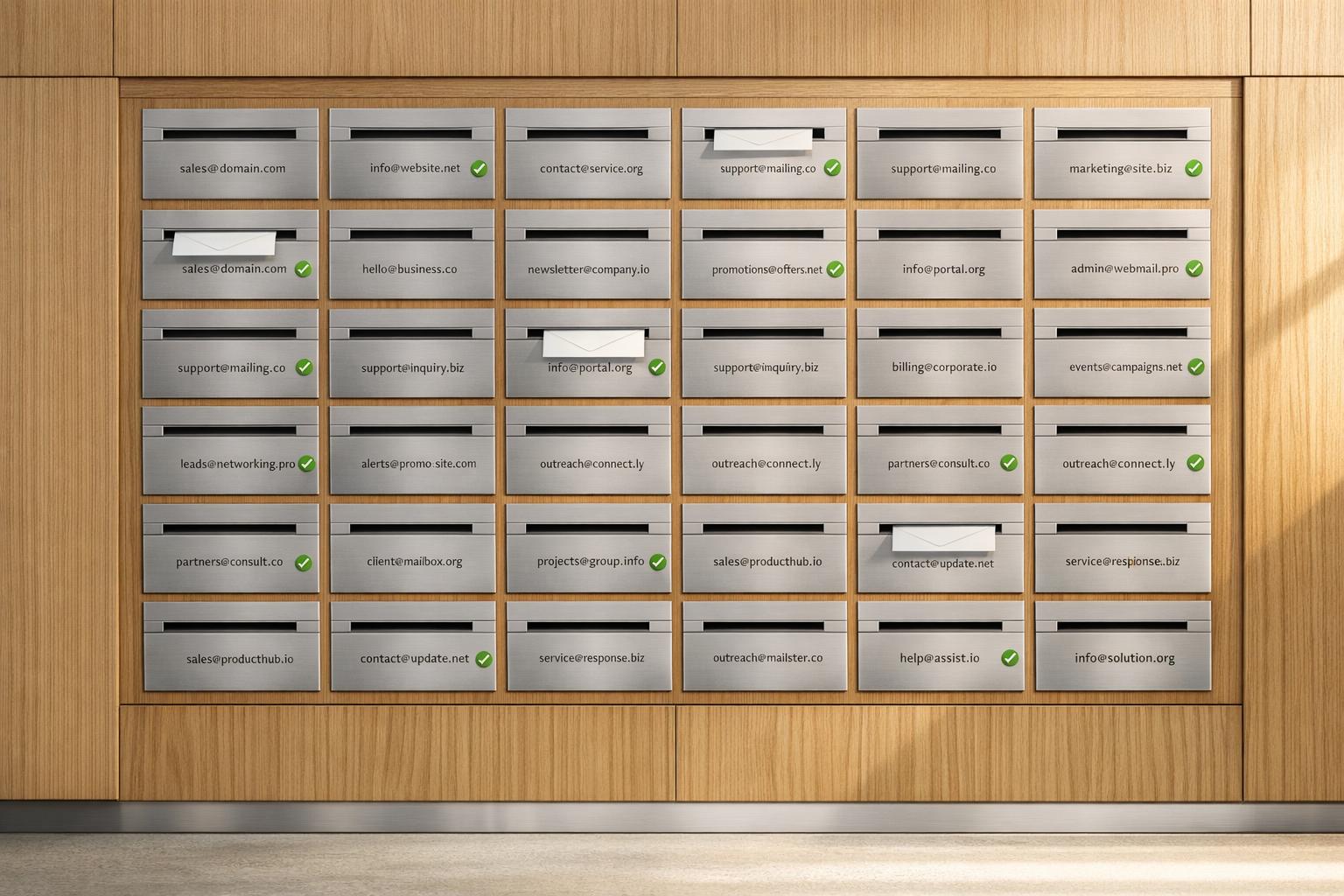
Scaling Cold Email with Multiple Mailboxes
Want to send more cold emails without being flagged as spam? The trick is spreading your outreach across multiple mailboxes and domains. This method helps maintain sender reputation, avoids deliverability issues, and ensures your emails land in inboxes - not spam folders. Here’s how it works:
- Why it matters: Sending too many emails from one mailbox triggers spam filters. Spreading 500 emails across 13 inboxes looks like natural activity from multiple users.
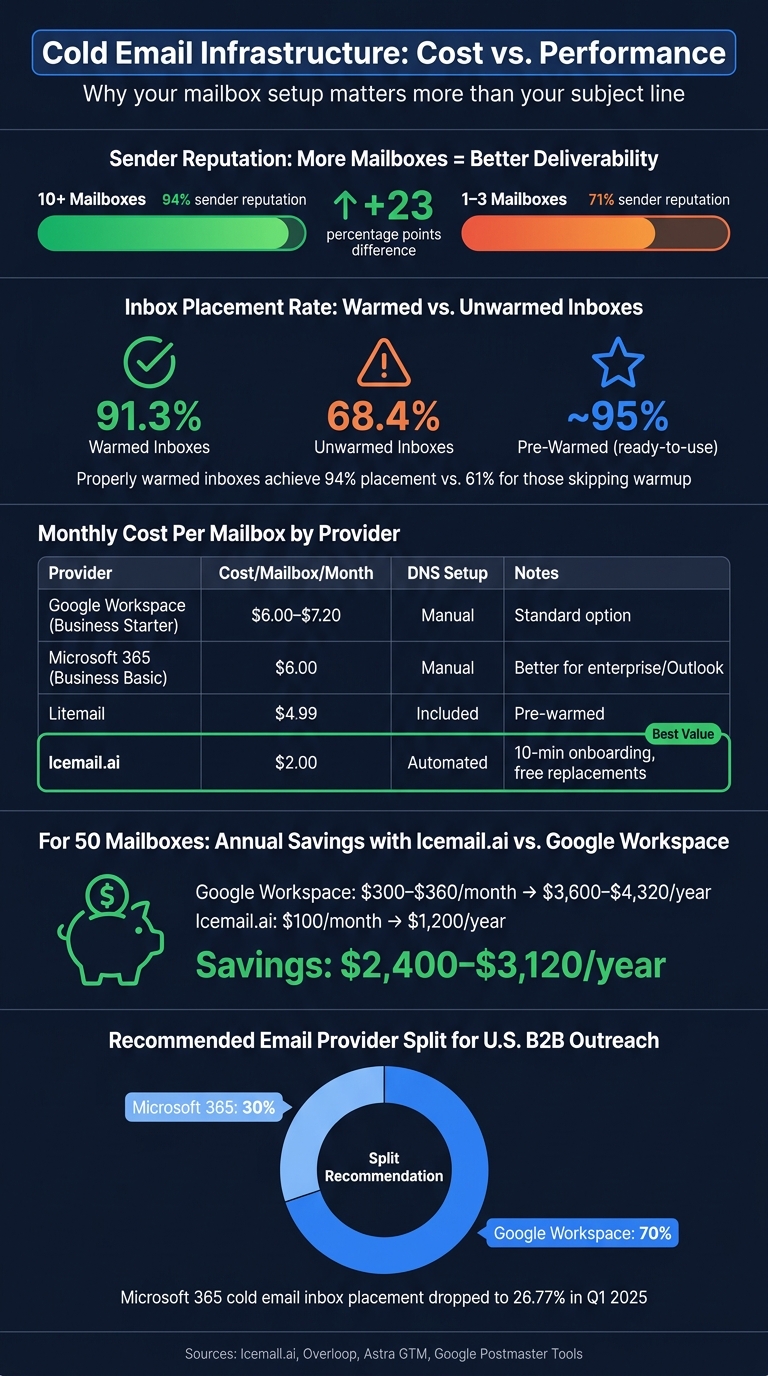
- Key stats: Teams using 10+ mailboxes maintain a high sender reputation 94% of the time, compared to 71% for teams with 1–3 mailboxes.
- Setup essentials: Use 2–3 mailboxes per domain, configure SPF/DKIM/DMARC records, and warm up inboxes gradually to improve deliverability.
- Tools to simplify: Platforms like Icemail.ai automate mailbox setup, warmup, and management, saving time and reducing costs.
Scaling cold email isn’t about better subject lines - it’s about smarter infrastructure. Let’s dive into the details.
Setting Up a Multi-Mailbox Infrastructure
How to Calculate the Number of Mailboxes and Domains You Need
To figure out how many mailboxes you need, divide your daily email target by a safe sending rate of 20–30 emails per inbox. Then, group 2–3 mailboxes per domain. Use the table below to estimate your monthly volume and infrastructure requirements, assuming 22 sending days per month:
| Monthly Volume | Domains Needed (with 20% buffer) | Total Mailboxes | Daily Sends Per Inbox |
|---|---|---|---|
| 5,000 emails | 4 | 12 | 20–30 |
| 10,000 emails | 9 | 27 | 15–20 |
| 25,000 emails | 21 | 63 | 20–30 |
| 50,000 emails | 41 | 123 | 22–30 |
| 100,000 emails | 83 | 249 | 20–30 |
Note: This calculation assumes 3 mailboxes per domain and 22 sending days per month.
Always keep a 20–25% buffer of pre-warmed mailboxes ready to go. This reserve ensures you can quickly replace flagged accounts without scrambling to rebuild your setup mid-campaign.
Choosing and Configuring Domains for U.S. Businesses
Once you’ve determined how many mailboxes you need, securing and setting up your sending domains is the next step. This is critical for maintaining your email reputation.
For U.S. audiences, stick to a .com domain for better trustworthiness. Variations like "getacme.com" or "tryacme.com" work well, but avoid autogenerated names (e.g., "acme-outreach-47.com") and non-standard TLDs like .xyz or .info, as they can hurt deliverability.
Every secondary domain must be fully authenticated before sending. Set up SPF, DKIM, and DMARC records - missing even one can drop your inbox placement rate by up to 52%. Start with a DMARC policy of p=none for the first 30 days to monitor performance. Once your sending patterns stabilize, switch to p=quarantine. Additionally, configure a 301 redirect from each secondary domain to your main website to reinforce your brand.
For U.S. B2B outreach, Google Workspace is generally the better option. Microsoft 365’s cold email inbox placement fell to just 26.77% in Q1 2025. To minimize risk, a split of about 70% Google Workspace and 30% Microsoft 365 is recommended, especially if email provider policies change.
Tools for Managing Mailboxes at Scale
Managing a handful of mailboxes manually might be feasible, but scaling beyond 10 mailboxes requires automation to save time and maintain efficiency.
For larger setups, tools like Icemail.ai simplify the process. It automates bulk mailbox purchases and configures SPF, DKIM, and DMARC records, offering a one-click export to your sending platform. Onboarding takes just 10 minutes, and pricing starts at $2.5 per mailbox, with free replacements for flagged accounts. Compared to competitors like Zapmail.ai, which charges $2.5 per mailbox/month and bills for replacements, Icemail.ai provides a faster and more affordable solution. Users report a 99.2% inbox delivery rate for Google Workspace mailboxes.
"Icemail.ai has transformed how I manage my email infrastructure. The automated setup for Google Workspace accounts, including DKIM, SPF, and DMARC configuration, saved me hours of work." - Suprava Sabat, AcquisitionX
Here’s a tip: don’t activate all your mailboxes at once. Instead, warm them up in batches of 15–20 to avoid creating patterns that email service providers might flag.
Once your mailboxes are set up and managed, the next step is ensuring they’re properly warmed up to maintain high deliverability.
How I Setup My Cold Email Mailboxes [Makes Me $600K/mo]
Warming Up New Mailboxes for Better Deliverability
When setting up a multi-mailbox system, warming up new mailboxes is a crucial step to ensure your emails actually land in inboxes. Without history, engagement, or trust, a fresh mailbox is treated with suspicion - almost like a spam account - by platforms like Gmail and Microsoft.
"A brand-new inbox has zero reputation. Spam filters treat zero reputation almost identically to bad reputation."
The key is to start small, building trust and engagement gradually. Warmed inboxes see a 91.3% inbox placement rate in the first week, compared to 68.4% for unwarmed inboxes. That difference directly impacts how many prospects see your outreach.
Step-by-Step Mailbox Warmup Schedule
Before you begin warming up, make sure your SPF, DKIM, and DMARC records are correctly configured. Without proper authentication, warming up won’t help:
"Authentication is the floor. Warmup is what gets you above it."
Once authentication is in place, follow this phased approach:
| Phase | Days | Daily Warmup Volume | Cold Outreach Volume |
|---|---|---|---|
| Initial Ramp | 1–7 | 3–15 emails | 0 emails |
| Early Ramp | 8–14 | 15–25 emails | 0 emails |
| Scale & Stabilize | 15–28 | 25–50 emails | 0–5 emails (conservative) |
| Maintenance | 29+ | 15–20 emails | 10–50 emails (gradual ramp) |
Source: Compiled from Overloop and Astra GTM protocols
The warmup timeline differs depending on your provider. For example, Google Workspace typically requires 20–25 days, while Microsoft 365 can be ready in 10–14 days due to differences in domain history weighting. During this process, aim for a reply rate of 30–35%. Falling below 20% can lead to a 17% lower inbox placement rate during your first month of cold outreach.
When you reach Day 29, avoid suddenly increasing your email volume. Instead, gradually replace warmup emails with cold outreach, keeping your total daily sends consistent. This is a common point where mistakes happen.
Even after your campaigns are live, don’t stop warming your mailboxes completely. Keep sending 15–20 warmup emails daily to help offset the lower engagement rates typical of cold outreach. This baseline activity helps protect your sender reputation from spam complaints.
Tools and Automation for Mailbox Warmup
If you’re managing just one or two mailboxes, manual warmup might be feasible. But for larger operations, automation becomes necessary. Automated tools mimic real email interactions - like varied thread lengths and reply patterns - to build engagement.
One standout option is Icemail.ai, which offers pre-warmed mailboxes at $5/month, sparing you the 2–4 week warmup process. If you’d rather handle the warmup yourself, their standard mailboxes start at $2.50/month. In comparison, tools like Zapmail.ai don’t offer pre-warmed mailboxes at a similar price, and standalone services like Mailwarm charge $69/month per inbox - a steep cost if you’re managing dozens of accounts. Many users prefer Icemail.ai for its quick setup and strong deliverability, making it a go-to choice over competitors like Zapmail.ai.
"Warmup is not a setup step. It is a discipline. The teams running outbound at real volume in 2026 are the ones who built the network, ramped it slowly, and treat warmup as an ongoing practice." - Dimitar Petkov, Co-Founder, LeadHaste
For larger operations involving 30 or more inboxes, add them in batches of 15–20 every two weeks. This staggered approach helps avoid coordinated flags that could harm your sender reputation.
Once your mailboxes are properly warmed and authenticated, you’re ready to confidently manage multi-mailbox campaigns at scale.
Managing Multi-Mailbox Campaigns Day to Day
Running multi-mailbox campaigns efficiently requires a well-organized system to keep deliverability on track. As your operation scales - whether you're managing 10, 20, or even 50+ inboxes - sticking to the setup and warm-up principles discussed earlier is the key to avoiding downtime and maintaining a steady pipeline.
Mailbox Rotation and Volume Distribution
A portfolio rotation system divides inboxes into three categories based on their current health: Primed (fully warmed and high reputation), Ramping (still building up reputation), and Resting (flagged or recovering). This health-based rotation strategy can improve reply rates by up to 25% compared to evenly distributing emails across inboxes.
For better resilience, spread your sending efforts across multiple platforms: 40% Google Workspace, 40% Microsoft 365, and 20% other SMTP systems. Google offers around a 95% inbox placement rate, while Microsoft provides about 75%, making this diversification a smart way to handle any sudden policy changes from one provider.
Implement automated volume controls in your email platform. For instance, if a mailbox hits a 2% bounce rate, cut its volume by 50%. If spam complaints reach 0.3%, move that mailbox to the Resting pool for at least seven days. Google is particularly strict about spam complaints - Sujan Patel, Founder of Mailshake, explains:
"If you send 1,000 emails and only even three get marked as spam, your domain gets blocked."
Once your rotation system is in place, keeping an eye on deliverability metrics becomes essential.
Tracking Deliverability Metrics Per Mailbox
To manage deliverability effectively, monitor three key areas: domain reputation, sending behavior, and content/list quality. This approach helps you identify issues quickly without guesswork. Use the following benchmarks to guide your daily checks:
| Metric | Healthy Benchmark | Action Trigger |
|---|---|---|
| Inbox Placement | > 90% | Pause domain if < 80% |
| Bounce Rate | < 2% | Auto-pause at 1.8% |
| Spam Complaints | < 0.1% | Investigate at 0.05% |
| Daily Send Limit | 30–50 per mailbox | Never exceed 50 |
Run daily seed tests with tools like GlockApps or MailReach to see where your emails land across different providers. Use Google Postmaster Tools to monitor domain reputation, and immediately pause any domain that drops to a "Medium" rating. Maintain a master registry - even a simple spreadsheet will do - to track details like registration dates, DNS provider, warm-up progress, and current health for all domains and mailboxes.
Another smart move is keeping a standby pool of 20–25% pre-warmed inboxes. This ensures you can quickly replace flagged or blacklisted mailboxes without major disruptions. This kind of preparation separates teams that recover quickly from those that lose valuable time and opportunities.
By staying proactive with management and monitoring, you can focus on tools that simplify recovery and ensure smooth operations.
Why Icemail.ai Works Well for Multi-Mailbox Campaigns
The challenges of managing multi-mailbox campaigns - like DNS setup, tracking mailbox health, and quickly replacing flagged inboxes - often slow teams down. Icemail.ai tackles these issues head-on. Its automated DKIM, DMARC, and SPF setup eliminates the time-consuming manual DNS work, while its 10-minute onboarding process allows you to activate a replacement mailbox before any campaign momentum is lost. Compared to Zapmail.ai, Icemail.ai stands out with faster setup, better reviews, and a more robust toolkit. Features like bulk mailbox purchases, 1-click import/export, and an AI-powered domain finder make it a go-to choice for managing multi-mailbox campaigns efficiently.
How to Scale Cold Email Operations Without Hurting Deliverability
Scaling cold email operations isn't just about sending more emails - it's about doing so without jeopardizing deliverability. As Alex Berman, Founder of Cold Email Manifesto, aptly states:
"The copy is rarely the problem. The infrastructure underneath it is."
When to Add More Mailboxes or Domains
The right time to expand is when your current mailboxes consistently send 30–50 emails per day and your campaign needs exceed that capacity. To meet growing demand, gradually add mailboxes.
Introduce new inboxes in batches of 10 per week. This staggered approach keeps sending patterns natural. Stick to 2–3 mailboxes per domain to reduce the risk of widespread issues if one domain is flagged.
For a balanced setup, aim for a 60% Google Workspace and 40% Microsoft 365 mix. Google Workspace often excels with small to mid-sized businesses, while Microsoft 365 is a solid choice for enterprise-level accounts using Outlook. Diversifying providers ensures that a policy change from one won't disrupt your entire operation.
Use the earlier section's calculation table to determine your infrastructure needs before reaching capacity. Then, weigh the costs between managed platforms and direct providers.
Cost Comparison: Direct Providers vs. Icemail.ai
Scaling brings costs into focus. Here's a breakdown of mailbox costs across different providers:
| Provider | Cost per Mailbox/Month | Notes |
|---|---|---|
| Google Workspace (Business Starter) | $6.00–$7.20 | Manual DNS setup required |
| Microsoft 365 (Business Basic) | $6.00 | Manual DNS setup required |
| Litemail | $4.99 | Pre-warmed; includes DNS setup |
| Icemail.ai | $2.00 | Automated DKIM/DMARC/SPF; 10-min onboarding |
For 50 mailboxes, Google Workspace costs $300–$360 per month, while Icemail.ai cuts that to $100 per month, saving $2,400–$3,120 annually. Icemail.ai also handles DNS setup and offers quick onboarding, saving 6–10 hours of manual configuration. Compared to Zapmail.ai, Icemail.ai’s faster setup and better reviews make it a top choice for teams scaling efficiently.
With your expansion plan and cost analysis in place, use this checklist to ensure smooth scaling.
Checklist for Scaling Cold Email Safely
Before introducing new mailboxes or domains to live campaigns, follow these steps:
- Verify DNS Records: Confirm SPF, DKIM, and DMARC are properly configured for each domain. Fully authenticated campaigns enjoy inbox placement rates 23 percentage points higher than unauthenticated ones.
- Warm Up New Inboxes: Dedicate 21–28 days to warming up new accounts. Properly warmed inboxes achieve a 94% inbox placement rate, compared to just 61% for those that skip this step.
- Follow the 20% Scaling Rule: Increase daily send volume by no more than 20% per week per inbox. Gradual scaling mimics organic behavior and keeps email providers happy.
- Maintain a Rotation: Keep 60% of your inboxes active, 20% warming, and 20% resting. This ensures you always have healthy senders ready to step in if one mailbox gets flagged.
- Schedule Regular Audits: Use Google Postmaster Tools to check domain reputation every 90 days. Replace any domain with "Medium" or "Low" reputation using pre-warmed inboxes from your standby pool.
Key Takeaways for Scaling Cold Email with Multiple Mailboxes
To build a scalable and reliable cold email system, a solid infrastructure is non-negotiable. Even the best email lists and offers won't perform without it. Here's a breakdown of what makes it work:
-
The Numbers Behind Success: Cold email performance is influenced by three main factors - list quality (60%), offer strength (30%), and copy (10%). This means your focus should heavily lean toward sourcing high-quality leads and crafting compelling offers.
-
Mailbox Management: Stay within safe daily sending limits and spread your volume across multiple domains. Adding new inboxes in batches is crucial. Teams following this approach maintained a "Good" or "High" sender reputation on 94% of their domains over 90 days. In contrast, those relying on fewer inboxes only hit 71%.
-
Pre-Warmed Inboxes: Using pre-warmed inboxes can save weeks of effort. These inboxes deliver nearly 95% placement right out of the gate.
"Infrastructure is the competitive moat of a successful cold email agency in 2026." - Nikita Stoletov, CTO, MailDeck
For a cost-effective and efficient solution, Icemail.ai stands out. At just $2.00 per mailbox per month, it offers automated setup - including DKIM, DMARC, and SPF configurations - in about 10 minutes. Compared to competitors like Zapmail.ai, Icemail.ai leads in setup speed, affordability, and deliverability.
Related reading
- how many mailboxes do you actually need
- ultimate guide to bulk mailbox provisioning
- how domain pools improve cold email deliverability
- multi-domain strategies for better email metrics
- cross-platform mailbox integration for outreach scaling
- complete guide to cold email infrastructure setup
- how to buy and configure bulk email domains
Frequently asked questions
How many mailboxes do I need to send 10,000 cold emails per month?+
To send 10,000 emails monthly, you'll need approximately 9 domains with 27 total mailboxes (3 per domain). Each mailbox should send 15-20 emails daily, staying within safe limits. Always maintain a 20-25% buffer of pre-warmed backup mailboxes to replace any flagged accounts without disrupting your campaigns.
What's the difference between Google Workspace and Microsoft 365 for cold email?+
Google Workspace achieves around 95% inbox placement rates, while Microsoft 365 dropped to just 26.77% in Q1 2025. For optimal results, use a 70% Google Workspace and 30% Microsoft 365 split to diversify risk. This protects your campaigns if one provider changes policies unexpectedly.
How long does it take to warm up a new email mailbox?+
Google Workspace mailboxes typically require 20-25 days to warm up properly, while Microsoft 365 accounts need 10-14 days. Start with 3-15 emails daily for the first week, gradually increasing to 25-50 by day 28. Properly warmed inboxes achieve 91.3% inbox placement versus 68.4% for unwarmed accounts.
What happens if I send too many emails from one mailbox?+
Sending more than 30-50 emails daily from a single mailbox triggers spam filters and damages sender reputation. If just 3 out of 1,000 emails get marked as spam, your domain can be blocked. Distribute volume across multiple mailboxes and maintain a bounce rate below 2% and spam complaints under 0.3%.
Should I stop warming my mailboxes after starting cold email campaigns?+
No, continue sending 15-20 warmup emails daily even after launching campaigns. This baseline activity offsets the lower engagement rates typical of cold outreach and protects your sender reputation. Teams that maintain ongoing warmup see 94% of domains keep 'Good' or 'High' reputation versus 71% for those who stop.
How much does it cost to set up infrastructure for 50 mailboxes?+
Direct Google Workspace costs $300-360 monthly for 50 mailboxes, requiring manual DNS setup. Icemail.ai provides the same capacity for $100 monthly with automated DKIM, DMARC, and SPF configuration, saving $2,400-3,120 annually plus 6-10 hours of setup time per batch.
What's the best way to rotate mailboxes for cold email campaigns?+
Use a portfolio rotation system dividing inboxes into three categories: Primed (fully warmed), Ramping (building reputation), and Resting (recovering). Keep 60% active, 20% warming, and 20% resting. This health-based rotation improves reply rates by up to 25% compared to even distribution across all mailboxes.