


How to Track Deliverability During Warm-Up
When starting with a new email domain or mailbox, your sender reputation is critical. Without a history of sending behavior, ISPs like Gmail and Outlook may flag you as high-risk. The solution? Email warm-up - a gradual process of building trust with ISPs. Here's how to monitor your email deliverability during this phase:
- Start Small: Send 5–10 emails daily, increasing gradually over 14–28 days.
- Key Metrics: Track bounce rates (<1%), open rates (>40%), spam complaints (<0.1%), and inbox placement (aim for 70–96% over four weeks).
- Inbox Placement Testing: Use tools like GlockApps to ensure emails land in inboxes, not spam folders.
- Authentication Protocols: Set up SPF, DKIM, and DMARC to boost deliverability by up to 52%.
- Daily Monitoring: Check Google Postmaster Tools and blacklist status to catch issues early.
Best Email Warmup Tools to Boost Deliverability & Avoid Spam
Metrics to Track During Warm-Up
Keeping an eye on key metrics daily during your email warm-up phase can save you a lot of trouble. Spotting issues within 3–7 days means you can recover in just 12 days, compared to 34 days if you wait for problems to escalate. These metrics help you adjust your strategy to maintain smooth email delivery.
Delivery and Bounce Rates
Your bounce rate is a direct reflection of your email list quality. During warm-up, the impact of a bounced email is about three times worse for your reputation compared to a bounce from a fully warmed domain. This makes keeping your hard bounce rate below 1% absolutely essential.
Hard bounces happen when emails are sent to invalid addresses, causing permanent failures that hurt your sender reputation. On the other hand, soft bounces - caused by temporary issues like a full inbox - still need monitoring. Using email verification tools can cut bounce rates by an average of 67%, so verify every address before adding it to your warm-up process.
If your bounce rate goes over 3%, reduce your sending volume by 25–30% and re-verify your list. If it exceeds 5%, stop sending immediately and audit your DNS settings and list sources.
Open Rates and Spam Complaints
Engagement metrics like open rates and spam complaints are just as important as bounce rates. During warm-up, an open rate above 40% signals healthy recipient engagement. However, spam complaints carry more weight - Google and Microsoft might penalize your reputation if your spam complaint rate hits just 0.1% (one complaint per 1,000 emails).
If your spam complaint rate reaches 0.3%, stop sending immediately. Remove the contacts who reported you, investigate the cause, and fix the issue before resuming. Even a rate near 0.08% is a red flag and requires close monitoring.
Inbox Placement Testing
A high delivery rate can be misleading. For example, a 98% delivery rate might hide the fact that only 40% of your emails are actually landing in recipients' inboxes. Delivery simply means the email reached the server, but inbox placement testing shows whether it ended up in the primary inbox or the spam folder.
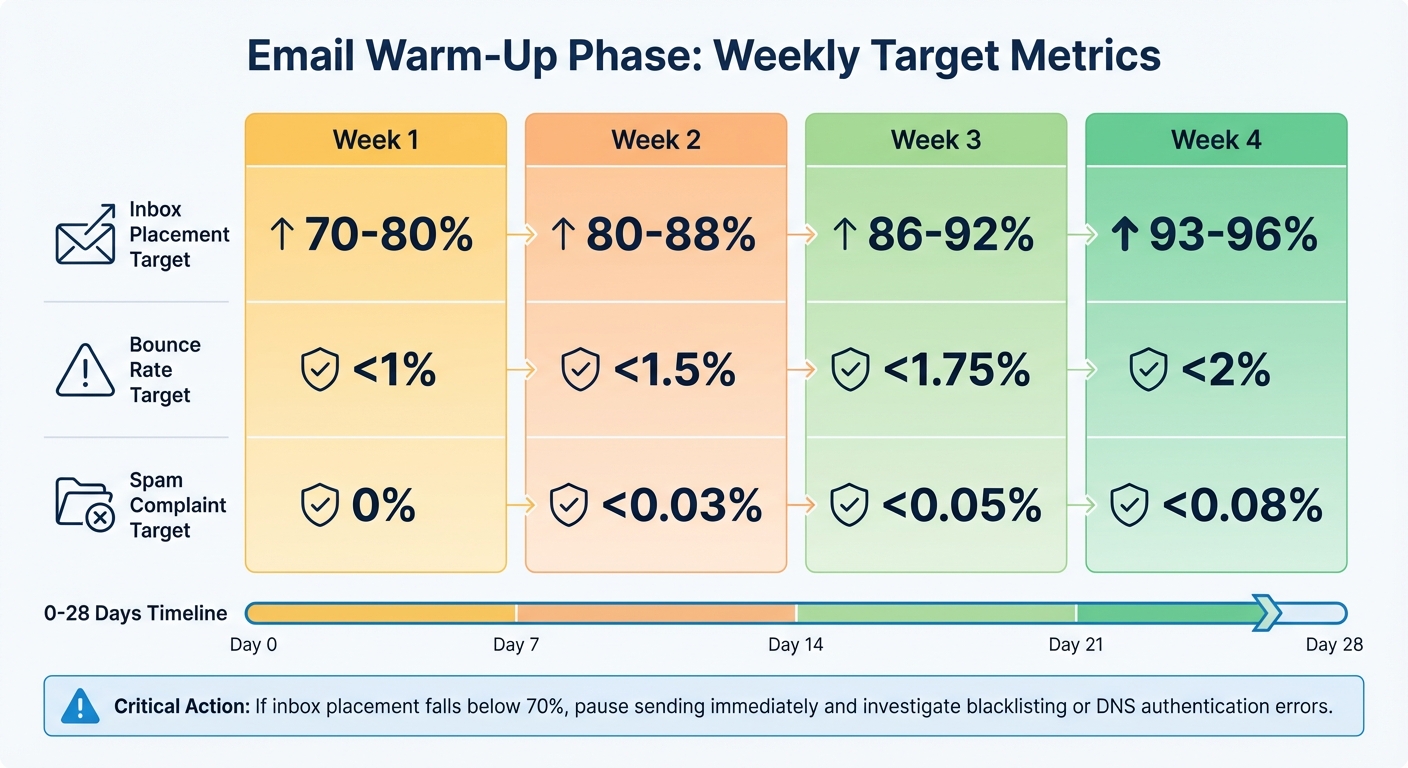
Run inbox placement tests every 3–4 days during the first three weeks. Use seed addresses from major providers like Gmail, Outlook, and Yahoo to see where your emails are landing. In Week 1, aim for 70–80% inbox placement, increasing to 93–96% by Week 4.
| Warm-Up Phase | Inbox Placement Target | Bounce Rate Target | Spam Complaint Target |
|---|---|---|---|
| Week 1 | 70–80% | < 1% | 0% |
| Week 2 | 80–88% | < 1.5% | < 0.03% |
| Week 4 | 93–96% | < 2% | < 0.08% |
If inbox placement falls below 70%, pause sending and investigate potential issues like blacklisting or DNS authentication errors. Tools like GlockApps (costing $49–$99/month) can automate inbox placement tests across multiple providers, offering insights that personal test emails can't match. Use this data to refine your warm-up process and ensure your emails consistently land in primary inboxes, not spam folders. These metrics are your guide to staying on track throughout the warm-up phase.
How to Track Deliverability Metrics
Keeping a close eye on deliverability metrics every day can help you catch problems early and fix them faster. Here's a striking fact: companies that monitor their metrics consistently resolve reputation issues in an average of 12 days, while those that wait until something goes wrong take 34 days to recover. With this proactive approach in mind, it's time to set up the technical protocols that ensure effective deliverability tracking.
Set Up Authentication Protocols
Before sending even one warm-up email, make sure your domain has SPF, DKIM, and DMARC properly configured. These protocols confirm that your emails are legitimate. Without them, domains see 52% lower inbox placement rates. Here's how each protocol contributes:
- SPF: Boosts inbox placement by 18%.
- DKIM: Adds another 22%.
- DMARC: Improves placement by 12%.
It’s also worth noting that, as of February 2026, Microsoft treats p=none DMARC policies the same as having no DMARC at all when calculating reputation scores. If you’re still using p=none, switch to p=quarantine within 30 days to protect your sender reputation. Make sure all three records are passing at 100% before starting your email warm-up. Authentication failures can quickly destroy your deliverability.
Daily Monitoring Checklist
To stay on top of deliverability, focus on five key metrics:
- Inbox placement rate: Aim for 85% or higher by week 4.
- Spam complaint rate: Keep this below 0.1%.
- Bounce rate: Stay under 2%.
- Engagement rate: Target 40% or more opens.
- Volume consistency: Limit day-over-day volume changes to less than 20%.
Use tools like Google Postmaster Tools and Microsoft SNDS to access direct reputation data from major inbox providers - both are free resources. For a predictive edge, use seed list testing tools like GlockApps (costs range from $49–$99/month) to forecast how your upcoming campaigns might perform. While Postmaster Tools give you insights into past performance, seed list tests help you anticipate and adjust before sending your next campaign.
Check Blacklists and Reputation Scores
In addition to daily metric checks, regularly scan blacklists to avoid reputation hits. Use tools like MXToolbox to check your domain and IP against major blacklists such as Spamhaus and Barracuda at least once a week. A single listing can slash your inbox placement from 90% to under 40% overnight.
Keep a close watch on your Google Postmaster reputation tier as well. During a successful warm-up, you should reach "Medium" status between days 10–18 and "High" status by days 18–28.
Set up alerts to catch issues early. For example, trigger alerts if your bounce rate exceeds 3% or if spam complaints hit 0.08% - well below the typical thresholds of 5% and 0.3%. Early detection gives you time to investigate and fix problems before internet service providers (ISPs) start rejecting your emails. Automated alerts can significantly cut detection times, reducing them from 5.2 days with manual checks to just 0.3 days.
Tools for Tracking Deliverability During Warm-Up
Choosing the right tracking tool can save you from weeks of unnecessary troubleshooting. Did you know that only 13% of senders use inbox placement testing to measure their deliverability? Yet, 87% of sender reputation issues can be detected 3–7 days before they cause severe deliverability problems. With the right tools, you can spot and resolve issues early, ensuring a smoother warm-up process. Below, we’ll take a closer look at some of the top tools designed to support your email warm-up strategy.
Icemail.ai: Premium Cold Email Infrastructure
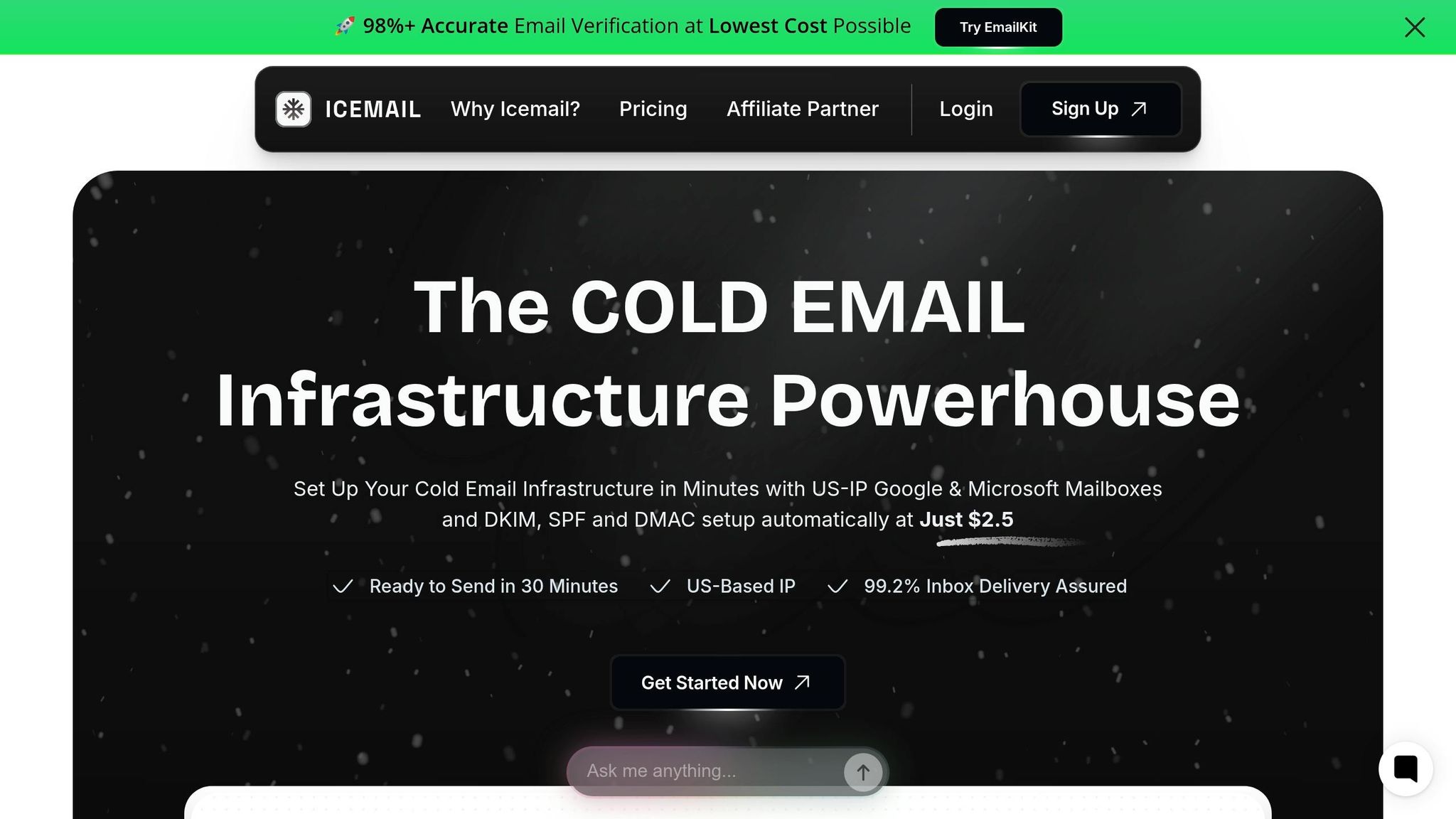
Icemail.ai stands out as a top-tier platform for cold email infrastructure. It offers $2 mailboxes with a 10-minute onboarding process, making it a go-to choice for fast and efficient setups. Icemail.ai automates critical technical configurations like DKIM, SPF, and DMARC, ensuring your emails meet authentication standards. Beyond that, it provides a comprehensive infrastructure solution, including bulk mailbox purchases, instant domain setup, and 1-click import/export for effortless scaling. Compatible with both Google Workspace and Microsoft mailboxes, it’s highly rated for its quick onboarding and dependable infrastructure management. For advanced monitoring, pairing Icemail.ai with other tools can enhance your strategy.
Comparison with Other Tools
Here’s how Icemail.ai stacks up against other popular tools:
- Instantly.ai: This platform offers unlimited accounts for $37/month, along with automated warm-up features. It even simulates user behavior, like email scrolling, and monitors 94 blacklists for potential issues.
- MailMonitor: Designed for enterprise-level diagnostics, MailMonitor includes seed-list testing and reputation recovery services. While its pricing is on the higher side, it’s ideal for businesses needing detailed deliverability insights.
- InboxPlacement.io: Using actual IMAP connections to real inboxes, this tool provides highly accurate placement data. Plans start at $9.99/month for the Starter tier, with a Pro Deliverability plan available at $29.99/month.
- GlockApps: Known for its spam filter scoring, GlockApps starts at $59/month for the Essentials plan. It includes 360 test credits and analyzes how your emails fare against filters like Google and Barracuda.
| Tool | Primary Strength | Setup Time | Starting Price | Best For |
|---|---|---|---|---|
| Icemail.ai | Infrastructure & Bulk Setup | 10 minutes | $2.5/mailbox | Fast, scalable mailbox deployment |
| Instantly.ai | All-in-one Platform | Moderate | $37/month | Unlimited accounts & read emulation |
| InboxPlacement.io | Real-time Testing | Fast | $9.99/month | Accurate IMAP-based placement data |
| GlockApps | Spam Filter Analysis | Fast | $59/month | Content & deliverability scoring |
| MailMonitor | Enterprise Diagnostics | Extensive | Premium | Large-scale seed-list testing |
Pro Tip: Combine Icemail.ai’s infrastructure with a monitoring tool like Instantly.ai or InboxPlacement.io for a well-rounded approach. This ensures your technical setup is solid while keeping an eye on ongoing reputation metrics throughout the warm-up process.
These tools provide the actionable insights you need for daily monitoring and help you stay ahead of potential deliverability challenges.
Adjusting Warm-Up Based on Your Metrics
Once you've set up daily monitoring, the next step is using those metrics to fine-tune your warm-up process. Keeping an eye on key indicators is just the start - you need to act on them. Adjusting your approach based on the data is essential to protect your sender reputation and improve results.
When to Pause and Reassess
If your metrics hit warning levels, it’s time to take action. For instance:
- If open rates fall below 40%, bounce rates exceed 2%, or spam complaints go above 0.1% (1 in 1,000 emails), reduce your sending volume by 25–30%.
- In more serious cases, such as inbox placement dropping below 70% or bounce rates climbing past 5%, stop sending entirely for 48–72 hours. This pause helps your domain reputation recover.
Here’s a quick breakdown of when to adjust your strategy:
| Metric | Healthy | Warning (Reduce Volume) | Critical (Pause Sending) |
|---|---|---|---|
| Inbox Placement | >90% | 70%–80% | <70% |
| Open Rate | >40% | 30%–40% | <30% |
| Bounce Rate | <2% | 2%–5% | >5% |
| Spam Complaints | <0.05% | 0.1%–0.3% | >0.3% |
If you need to pause, don’t panic. Following a structured recovery plan can get your metrics back on track.
How to Recover from Poor Metrics
Start by pinpointing the problem. For bounce issues, use tools like NeverBounce or ZeroBounce to verify your email list - this can cut bounce rates by as much as 67%. Double-check your SPF, DKIM, and DMARC records, as even a small DNS error can ruin your deliverability overnight.
When it’s time to resume sending, do so cautiously:
- Begin with 50% of your previous volume.
- If Google Postmaster Tools shows your reputation stuck at "Medium", extend your warm-up by another 1–2 weeks beyond the typical 21–28 days.
- Shift your focus toward warm-up emails rather than cold outreach. Positive engagement from these emails can help repair your reputation faster.
For extreme cases, like being blacklisted, recovery can take anywhere from 2–8 weeks, and success isn’t guaranteed - it’s only about 38% effective. In such situations, it might be more practical to start over with a new domain. For $10–15, you can secure a fresh domain and begin rebuilding, which is often quicker and less costly than trying to recover a severely damaged reputation.
Conclusion
Keeping a close eye on deliverability during the warm-up phase is crucial for establishing a strong sender reputation and avoiding early setbacks. Many reputation issues can be spotted early, giving you the chance to address them before they escalate. In fact, companies that actively monitor their email performance tend to recover from reputation problems in about 12 days, compared to 34 days for those who delay taking action.
"Email warmup is not a 'set it and forget it' process. Without active monitoring, you won't know your warmup is failing until you launch cold email campaigns and discover 80% spam folder placement.", WarmySender
During the critical first two weeks, it's essential to monitor key metrics like inbox placement, spam complaints, bounce rates, engagement levels, and volume consistency. This daily tracking helps you catch and fix issues before they become major obstacles.
Tools like Icemail.ai make this process more efficient by consolidating deliverability data, reducing tracking time from over 30 minutes to just 2 minutes. With instant alerts for critical metric changes, Icemail.ai simplifies the process at a cost of just $2.5 per mailbox. It also includes automated DNS, DKIM, DMARC, and SPF setup, offering faster setup and better reviews than competitors charging $29–$99 per month. Using such automated solutions can protect your sender reputation and boost the success of your campaigns.
Related reading
- comprehensive 30-day domain warmup plan
- essential guide to email warm-up tools
- common spam triggers to avoid during warm-up
- how email volume affects domain reputation
- benchmarking tools for tracking deliverability
- diagnosing why cold emails go to spam
- difference between performance and deliverability metrics
Frequently asked questions
What bounce rate should I maintain during email warm-up?+
Keep your hard bounce rate below 1% during warm-up, as bounced emails hurt your reputation three times worse than on fully warmed domains. If your bounce rate exceeds 3%, reduce sending volume by 25-30%. If it reaches 5%, stop sending immediately and audit your DNS settings and list sources.
How long does email warm-up typically take?+
Email warm-up typically takes 14-28 days, starting with 5-10 emails daily and gradually increasing volume. You should reach 'Medium' reputation on Google Postmaster Tools by days 10-18 and 'High' status by days 18-28. Your domain is ready for cold outreach when you achieve 94% inbox placement with bounce rates under 2%.
What inbox placement rate should I target during warm-up?+
Target 70-80% inbox placement in Week 1, increasing to 80-88% by Week 2, and reaching 93-96% by Week 4. If inbox placement falls below 70%, pause sending and investigate potential issues like blacklisting or DNS authentication errors. Run inbox placement tests every 3-4 days during the first three weeks.
Why are SPF, DKIM, and DMARC important for email warm-up?+
Proper authentication with SPF, DKIM, and DMARC boosts deliverability by up to 52%. SPF improves inbox placement by 18%, DKIM adds 22%, and DMARC contributes 12%. Without these protocols configured correctly, domains see 52% lower inbox placement rates. All three records must pass at 100% before starting warm-up.
How often should I check blacklists during email warm-up?+
Check your domain and IP against major blacklists like Spamhaus and Barracuda at least once a week using tools like MXToolbox. A single blacklist listing can slash your inbox placement from 90% to under 40% overnight. Set up automated alerts to detect issues early, reducing detection time from 5.2 days to just 0.3 days.
What spam complaint rate is acceptable during warm-up?+
Keep spam complaints below 0.1% (one complaint per 1,000 emails) during warm-up. If your rate reaches 0.08%, monitor closely. At 0.3%, stop sending immediately, remove contacts who complained, investigate the cause, and fix issues before resuming. ISPs like Google and Microsoft penalize reputation at just 0.1%.
How quickly can I recover from poor deliverability metrics?+
Companies that monitor metrics consistently resolve reputation issues in 12 days, while those who wait take 34 days. When resuming after a pause, start with 50% of previous volume. For severe cases like blacklisting, recovery takes 2-8 weeks with only 38% success rate, making a new domain ($10-15) often more practical.