
Run every list through verification before it reaches a sequencer, handle catch-all and risky results as a separate, limited segment, and re-verify any list older than a few weeks. That routine is cheap compared with the cost of a burned domain.
- Verification checks whether an address is likely to accept mail, using syntax checks, DNS and MX lookups, and a probe of the receiving mail server
- Most cold email guides treat a bounce rate under 2% as the safe zone, which is an industry rule of thumb rather than a number published by Google
- Estimates of how many B2B addresses sit on catch-all domains range from about 8% to more than 30%, depending on how the data is measured, so test your own list
- One verifier's tests found that accept-all addresses were 27 times more likely to bounce than standard valid addresses
- Email data decays, with one 2025 vendor report putting average annual list decay at 28%, and a peer-reviewed study estimating that 18% of contact addresses in a scientific database were invalid
- Verify close to the send date, because one test found 2.3% of a clean sample had gone invalid after 8 weeks
- Verification proves an address exists, not that the person agreed to hear from you, so it complements targeting and opt-out handling and never replaces them
A cold email list is the one part of your infrastructure that you do not control. You choose the domains, the mailboxes, and the volume. But the addresses come from databases, scrapers, and enrichment tools that were accurate on the day someone built them and have been decaying ever since. Every address that no longer exists produces a bounce, and every bounce is a signal that your mailbox is sending to people it has not researched. That is why email verification for cold email is not an optional extra. It is the step that protects every other investment you have made in domains, mailboxes, and warm-up. This guide explains how verification works, what it cannot do, how to handle catch-all email verification results, how to choose the best email verifier for your list, and which email list cleaning tools fit which workflow. By the end, you will have a pre-send routine that keeps bounce rates low and your sending reputation intact.
Key Terms Before You Clean a List
Email verification is the process of checking whether an email address is valid and likely to accept mail. A hard bounce is a permanent delivery failure, such as an address that does not exist. A soft bounce is a temporary failure, such as a full mailbox or a deferral. An SMTP probe is a check in which a verifier connects to the receiving mail server and asks whether it would accept mail for an address, without sending a message. A catch-all domain*, also called accept-all, is a domain whose mail server accepts mail for any address, real or invented. A role-based address is a shared address such as info or sales. A disposable address is a temporary address from a throwaway service. A spam trap is an address used to identify senders with poor list practices. List decay is the rate at which valid addresses become invalid as people change jobs and companies change systems. These terms matter because verification tools label results differently. One tool's risk is another's unknown, so learn what each label means in the tool you use.
Why Email Verification Matters for Cold Email
Email verification matters because bounces damage sender reputation quickly, and cold email lists contain far more invalid addresses than permission-based lists.
Receiving systems treat a stream of messages to nonexistent addresses as a sign of poor list practices. The most quoted rule of thumb is that a bounce rate above 2% is a red flag, and some guides report that sending platforms and mailbox providers begin throttling when bounces reach 3% to 5%. These are industry benchmarks, not published provider rules, but they match the experience of most deliverability practitioners. One data provider cites a 2025 figure of 1.71% for the overall B2B cold email bounce rate in a 7.5 million message dataset, and another reports that unverified B2B campaigns often see 7% to 8%. Those numbers come from vendors, so treat them as directional.
What bounces cost in practice
The arithmetic is unforgiving at cold email volumes. If you send 1,000 emails a day across 50 mailboxes at 20 per mailbox, a 5% invalid rate produces 50 hard bounces a day, which is two and a half times the 20 that a 2% bounce rate would allow. Spread across 50 mailboxes, that is about one bounce per mailbox per day, every day, which is a pattern that mailbox providers notice. Cleaning the list before you send is far cheaper than replacing mailboxes after the damage.
Verification and sender reputation
Bounces also feed other problems. High bounce rates correlate with poor targeting, and poor targeting correlates with spam complaints. Icemail's overview of how bad prospect lists hurt deliverability shows how the two problems compound, and its guide on how to fix hard and soft bounces explains how to read the bounce codes that verification is meant to prevent.
How Email Verification Works
Email verification runs a series of checks, from cheap syntax tests to a live probe of the receiving mail server, and returns a result that estimates whether the address will accept mail.
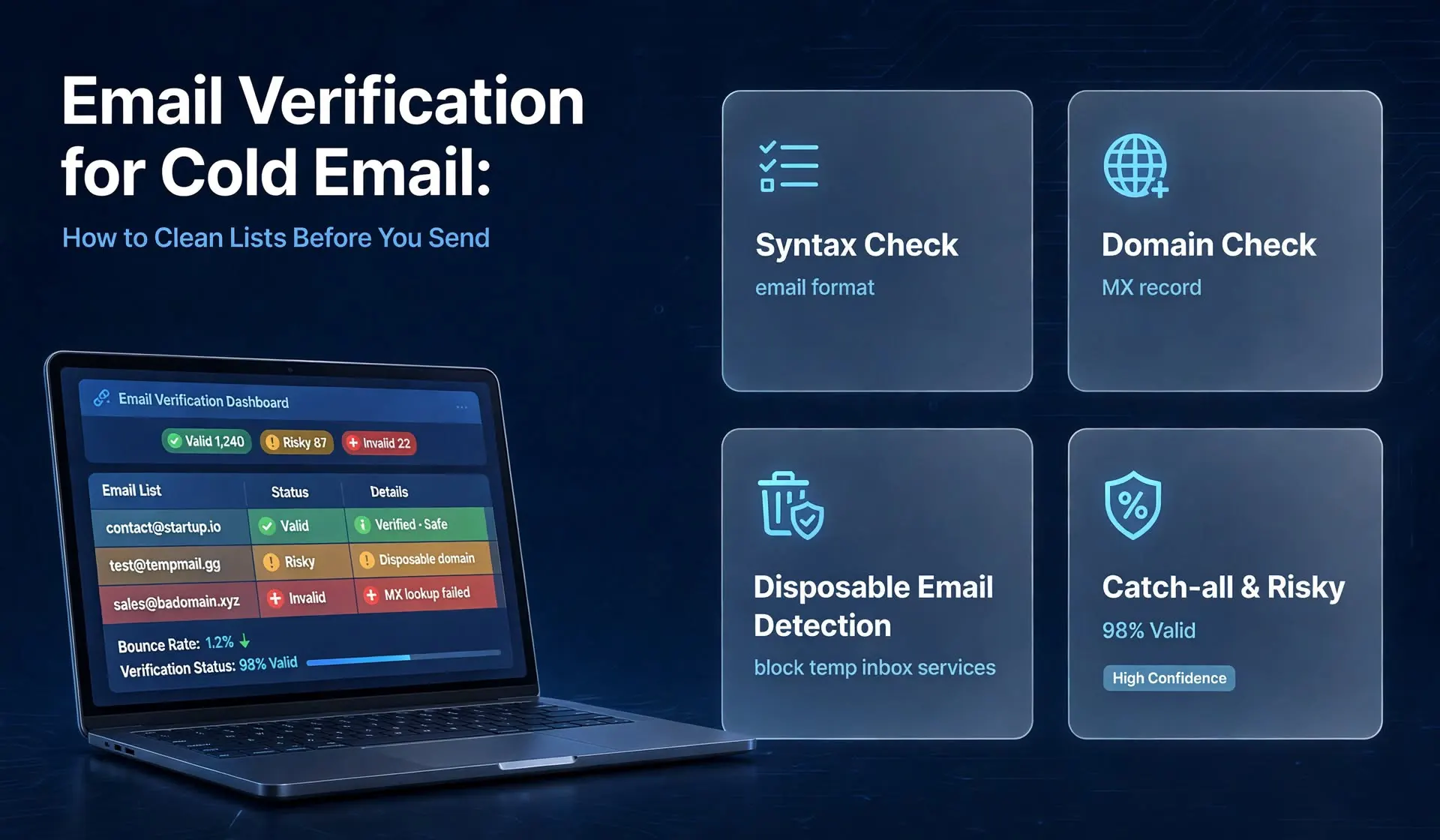
A typical verifier runs the following steps in order. First, a syntax check confirms that the address is correctly formatted. Second, a domain check confirms that the domain exists and has MX records, which show where its mail is received. Third, the verifier looks for disposable domains, role-based prefixes, and known problem patterns. Fourth, an SMTP probe connects to the mail server and starts a mail transaction, up to the point where the server says whether it would accept the recipient, then stops before sending any message. Fifth, the verifier tests for catch-all behavior, usually by probing an address that should not exist. Sixth, the tool combines the evidence into a label, such as valid, invalid, risky, or unknown, and sometimes a confidence score.
Why probes are imperfect
The probe step is where accuracy varies. Many servers block or rate-limit probes, others delay their answers, and some consumer mail providers do not reveal whether a mailbox exists. Spamhaus, which operates widely used blocklists, notes that mail servers have disabled the older lookup commands for years, and that verification services therefore work by simulating delivery and reading the response. That makes verification a probabilistic exercise, not a guarantee. A good verifier will tell you when it could not reach a clear answer, and a poor one will report validity whenever a server said it was accepted.
What Email Verification Cannot Do
Verification answers one question: does this address appear to exist? It does not answer the other questions that decide deliverability. It does not confirm permission. Spamhaus points out that verification does nothing to establish that the recipient agreed to receive mail, which is a separate and more important step for many kinds of sending. For cold email, that means targeting, relevance, and opt-out handling still matter as much as they did before you verified. It does not catch every spam trap, because traps are real addresses that accept mail by design. It does not confirm that the address belongs to the person you think it does, so a verified address may still be the wrong contact. And it does not stay accurate for long, because the moment you verify a list, it starts to decay.
List Decay: Why Timing Matters
Email addresses go stale as people change jobs and companies change systems. A 2025 report from a verification vendor put average annual list decay at 28%, up from 22% to 23% in earlier years, with B2B lists decaying faster. A peer-reviewed study of contact addresses in a large biomedical database estimated that email addresses decay with age, with 18% of contact addresses estimated to be invalid. That study covers academic authors, not sales prospects, so treat it as supporting evidence that decay is real, not as a benchmark for your list. The practical number comes from short-term tests. One verifier re-checked 1,278 addresses that had been marked valid and found that 2.3% had become invalid after 8 weeks, which on its own would use more than the 2% bounce budget. Verify as close to the send date as you can. If a list has sat for more than a month, verify it again before sending. If you pull leads from an enrichment tool on a schedule, verify them as part of the same step.
Catch-All Email Verification: What to Do With Risky Results
Catch-all email verification is hard because a catch-all server says accepted to every address, so the probe cannot tell a real mailbox from a made-up one. A catch-all domain accepts mail for any address at the domain, then decides later what to do with it, which might mean delivering it to a real person, routing it to a shared mailbox, or discarding it. To a verifier, the SMTP response looks the same either way. That is why catch-all results are usually labeled risky or accept-all rather than valid.
How common are catch-alls?
Estimates vary widely. Guides cite figures from roughly 15% to 30% of B2B domains being catch-all, and one study of business addresses found about one in five on a catch-all domain. A 2026 data study from another verifier paints a more nuanced picture. It reported that 33.1% of its verification attempts landed on catch-all domains, but that nearly two thirds of those came from two consumer providers that block probing and so look like catch-alls to a verifier. On mail it could probe cleanly, it found true catch-all behavior in only 1.4% of cases, and about 8.2% on verifiable Microsoft 365 and Google Workspace business mail. These are vendor datasets, and they use different definitions. The honest conclusion is that the share on your list depends on your sources and your verifier, so measure it.
How risky are they?
Another vendor's tests found that accept-all addresses were 27 times more likely to bounce than standard valid addresses. A different verifier offers a rule of thumb that accept-all addresses tend to bounce at about half the rate of the invalid addresses on the same list, so a list with 10% invalid results may see up to about 5% of its accept-all addresses bounce. A third vendor reports that 23% of unverified catch-all emails bounced hard. These figures disagree because they measure different lists, and they point in the same direction. Catch-all addresses are riskier than valid addresses and far less risky than known invalid ones.
A worked example
Suppose you verify 10,000 contacts and get 7,200 valid, 1,300 invalid, 1,200 catch-all, and 300 unknown. Remove the invalid results. If you apply the rule of thumb that catch-alls bounce at half the invalid rate, the invalid rate is 13%, so catch-alls might bounce at about 6.5%. Sending all 1,200 would produce about 78 bounces. On 8,400 total sends, those catch-alls alone would add about 0.93 percentage points to your bounce rate, which uses nearly half of a 2% budget before the valid addresses contribute anything.
A practical policy for catch-all addresses
Treat catch-all addresses as a separate segment with its own limits. Keep their share of daily sends small, and send them from mailboxes you can afford to rest. Send in small batches, watch the bounces over the next 72 hours, because some catch-all servers accept mail and bounce it later, and stop if the rate climbs. Prioritize high-value accounts, and skip catch-all addresses at low-value companies. Use a second verification pass or a tool with confidence scoring where available, and tag every catch-all contact in your CRM so the status travels with the record. If your bounce rate is already near the limit, hold the segment until it recovers.
How to Clean a Cold Email List Step by Step
A reliable cleaning routine runs in a fixed order: normalize, filter, verify, segment, suppress, send in stages, and monitor.
First, normalize the list by removing duplicates, trimming spaces, and fixing obvious typos in domains. Second, filter out role-based addresses, disposable domains, and contacts at companies you should not contact, such as customers and competitors. Third, verify the remaining addresses with a verifier that supports catch-all handling. Fourth, segment the results into valid, invalid, risky or catch-all, and unknown. Fifth, suppress invalid results everywhere, including your CRM and every active sequence, so they cannot come back through another import. Sixth, send valid contacts first, and add catch-all and unknown segments in small batches. Seventh, monitor bounces by source and by segment, and feed every new bounce into your suppression list automatically. Eighth, re-verify on a schedule, with any list older than a few weeks verified again before it is used. The same routine applies to leads that arrive continuously from enrichment tools. Put the verification gate between enrichment and the sequencer, so no address reaches a mailbox unverified. Icemail's ultimate guide to email list cleaning walks through the process in more detail.
How to Choose the Best Email Verifier
The best email verifier is the one that is most accurate on your own data, handles catch-all addresses transparently, and fits your workflow, so test candidates on a sample before you commit.
Public rankings of verifiers are often written by the vendors themselves, so they are a weak basis for a decision. Build your own test instead. Take a sample of 500 to 1,000 addresses where you know the outcomes, for example from a past campaign with known bounces, and run it through two or three tools. Compare how many known bounces each tool caught, how many good addresses each tool wrongly flagged, and how it labeled catch-alls. Judge candidates on a few criteria. Check how clearly the tool labels catch-all and unknown results, and whether it offers a confidence score or a second pass for them. Check how it treats unknown results in billing, since some tools charge for them and others do not. Check speed and volume limits for bulk lists and real-time API checks. Check integrations with your enrichment tool, CRM, and sequencer. Check how it handles privacy and data retention, which matters under privacy laws. And check price per verification at your volume, including whether credits expire. Icemail's overview of the best email verification tools compares options, and Icemail also lists a free email verifier on its site that you can use to spot check small batches. Whichever you choose, re-test it periodically, because verifier accuracy can change as mail providers change how they respond to probes.
Email List Cleaning Tools: Which Type Fits Your Workflow
Email list cleaning tools fall into a few groups, and most teams use more than one. Standalone verifiers take a file or an API call and return a result for each address. They are simple and flexible, and they suit teams that pull lists from many sources. Enrichment platforms with built-in verification find or enrich contacts and verify them in the same step, often by checking several data sources in a waterfall. They suit teams that build lists from scratch. Sequencer-integrated verification checks addresses when you upload them to a sending platform. It is convenient, but make sure it handles catch-all addresses the way you want. CRM hygiene tools clean and deduplicate existing records on a schedule, which matters for older databases. Manual checks, such as MX lookups and spot checks, help for tiny lists, but they do not scale. Whatever combination you use, place verification as late as you can in the pipeline, and make sure the result is stored on the contact record. Clay's own guidance on automating outreach, for example, shows a gate between enrichment and sending that holds catch-all and risky addresses, and illustrates how a stricter gate lowers the bounce rate the sequencer sees. That is one vendor's illustration, but the design principle is sound.
Bounce Rate Targets and Monitoring After You Send
Set explicit thresholds before a campaign launches. A common target is a total bounce rate under 2%, ideally closer to 1%. Review bounces daily during the first days of a campaign and weekly afterward. If a single mailbox or domain shows a spike, pause it, because the problem may be a source of bad addresses rather than a general issue. If a single company produces many bounces, check whether its mail system is rejecting your messages for policy reasons, which is a different problem from a bad list. Keep the suppression list automatic. Every hard bounce should be added to a global suppression list immediately, and every unsubscribe and complaint should be added with it. Do not rely on manual exports.
Common Mistakes
The first mistake is verifying once and sending for months. The second is treating risky results as valid. The third is sending all catch-all addresses on day one. The fourth is skipping verification for leads that arrive from a trusted source, since every source has errors. The fifth is verifying the list but not suppressing invalid results in the CRM, so they return on the next import. The sixth is trusting a verifier's accuracy claims without testing them. The seventh is assuming verification replaces targeting and consent, which it does not. Avoiding these protects both your bounce rate and your reputation.
Final Verdict
Email verification is a small step that removes a large source of risk. It will not make a bad list good, and it will not prove that anyone wants your email. What it will do is stop you from sending to addresses that do not exist, and give you a way to manage the uncertain ones deliberately instead of by accident. Verify every list as close to the send date as you can, treat catch-all and risky results as a limited segment, suppress bounces automatically, and test your verifier on your own data. Do that, and your domains and mailboxes can focus on what they are meant to do, which is getting real messages to real people.
Frequently Asked Questions
What is email verification for cold email?
Email verification for cold email is the process of checking whether addresses on a prospect list are valid and likely to accept mail before you send. It uses syntax checks, DNS and MX lookups, and a probe of the receiving mail server, and it returns labels such as valid, invalid, risky, or unknown so that you can remove bad addresses and keep bounces low.
How do I handle catch-all email verification results?
Treat catch-all or accept-all results as a separate, limited segment. Keep their share of daily sends small, send them in small batches from mailboxes you can rest, watch bounces for 72 hours, prioritize high-value accounts, and skip low-value ones. Use a second verification pass or a confidence score if your tool offers one.
What is the best email verifier for cold email?
The best email verifier is the one that performs best on your own data. Test two or three tools on a sample of 500 to 1,000 addresses with known outcomes, compare how many bounces each catches and how it labels catch-all addresses, and check pricing for unknown results, integrations, speed, and data privacy before you commit.
How often should I verify a cold email list?
Verify as close to the send date as possible and re-verify any list that is more than a few weeks old. One test found that 2.3% of a clean list had gone invalid after 8 weeks, and vendor reports put annual list decay at around 28%, so a list verified months ago is not safe to send.
What bounce rate is safe for cold email?
Most guides treat a bounce rate under 2% as the safe zone, ideally closer to 1%, and report that sending platforms can start throttling when bounces reach 3% to 5%. These are industry rules of thumb rather than provider rules, so set your own stop threshold and pause a mailbox or campaign when it is exceeded.